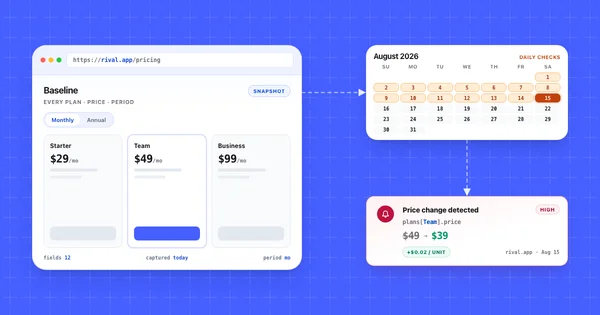


Here is a pattern teams recognize: a competitor reprices a plan tier mid-week, the Google Alerts inbox stays quiet, and someone on sales hears about it from a prospect days later. Nothing new was published and nothing new was indexed, so there was nothing to send.
Most teams set up Google Alerts in the first week of competitive research, and that is a reasonable first move. It is free, it takes four minutes, and it does one job honestly. The trouble starts when a team reads an empty inbox as a quiet competitor.
What you'll learn
- What Google Alerts indexes, and what it structurally cannot see
- How to set up Google Alerts for a company, plus a starter alert set for one competitor
- The four blind spots that decide whether Alerts is enough on its own
- When Alerts alone is the right answer and you should buy nothing
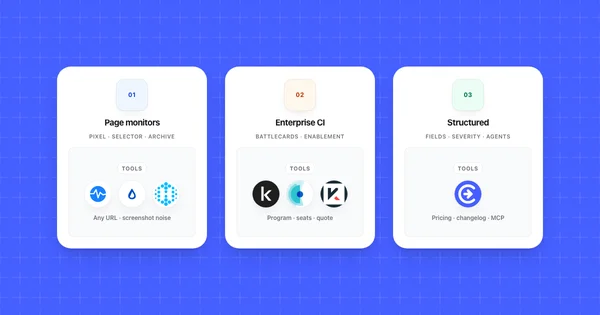
- How keyword alerts, page monitors, and structured monitoring divide the work
- A three-layer stack, and the mistakes teams make when they outgrow layer one
TL;DR: Google Alerts watches Google's search index for newly indexed content matching a keyword. It catches press coverage, funding news, and new blog posts. It does not watch a URL, so a silent edit to a pricing page, changelog, or docs site never fires an alert. Layer page-level monitoring on top to close that gap.
What Google Alerts actually monitors
Google Alerts monitors Google's search index for newly indexed content matching your query, then emails you the results or publishes them to an RSS feed. It watches the index, never a specific page.
That distinction drives everything else. When Google's crawler discovers a URL it has not seen before and the page matches your query, you get a result. When a page indexed two years ago quietly changes its contents at the same URL, there is usually no new result to send.
The configuration surface is small: six settings under Show options, which the setup steps below walk through one by one.
Two consequences follow. Timing is bound to Google's crawl schedule rather than the publish time, so as-it-happens really means as-it-is-indexed. And coverage is bound to what Google chooses to index. Alerts was built as a mention tracker and it is a good one, but it answers a different question than "did my competitor change something." For the wider category, see what competitor monitoring covers.
How to set up Google Alerts for a company (and where it falls short)
To set up Google Alerts for a company, go to google.com/alerts, type the company name in quotation marks, adjust the six settings under Show options, and click Create Alert. You can create Google Alerts in a few minutes apiece, and a starter set for one competitor is five of them.
- Sign in at google.com/alerts with the account that should own the alerts. Alerts belong to whoever creates them. Use a shared team account, or the whole configuration walks out the door when that person changes jobs.
- Type the query in the box at the top. Put the company name in quotation marks, for example
"Northwind"for a hypothetical rival. The Alert preview under the box shows what the alert would catch right now, so adjust the query until the preview looks right. - Click Show options and set the six settings.
- How often: As-it-happens, At most once a day, or At most once a week. Daily suits nearly every company query.
- Sources: Automatic, or a type such as News, Blogs, Web, Video, Books, Discussions, or Finance. Leave it on Automatic until you can name the noise you want gone.
- Language and Region: match the markets where the company sells.
- How many: Only the best results or All results. Choose All results, because the best-results filter can drop the long-tail forum thread that turns out to be the most useful item.
- Deliver to: your email address or an RSS feed. RSS stays workable past three or four alerts and keeps competitor news out of your inbox.
- Click Create Alert.
To change an alert later, click Edit next to it, make your changes, and click Update alert. To remove one, click Delete, or click Unsubscribe at the bottom of any alert email. Google's help page walks through the same steps.
Three operators from Google's search help do most of the work in a company alert. Quotation marks force an exact match, so a two-word name stays one phrase instead of two words that can land anywhere on a page. A minus sign drops a word you never want, which is how you handle a name that is also an ordinary word: in the Alert preview on October 24, 2026, jaguar -car -cars returned only Jacksonville Jaguars results and no car pages. The same operator removes a whole domain with -site:. site: limits results to one domain, with no space after the colon.
A starter set for one rival, using the hypothetical Northwind and a placeholder domain:
| Alert query | What it catches | How often |
|---|---|---|
"Northwind" -site:northwind.example |
Press, blog posts, and forum threads naming the company, minus its own pages | At most once a day |
"Northwind" pricing |
Third-party coverage discussing what they charge | At most once a day |
site:northwind.example |
New URLs Google indexes on their own domain | At most once a day |
"Northwind" funding |
Funding rounds, where speed helps | As-it-happens |
"Northwind" alternative |
Comparison and review content, including pages naming you | At most once a week |
OR also works for grouping variants, as in "Northwind" (funding OR acquires), but Google's search help doesn't list it, so check the Alert preview before you rely on it.
Run the set for two weeks, then prune. Every query you keep should have produced at least one item somebody read. Google caps how many alerts one account can hold but does not publish the number, and long before you reach it you will have alerts nobody owns.
Where it falls short: every query above fires only when Google indexes a new matching result. The site: query is the closest Alerts gets to watching a competitor's own website, and it stays silent when an existing page, such as the pricing table, is edited. The blind spots below cover that gap and three others, and the layered stack section shows what to add on top.
The four blind spots that matter for competitor monitoring
Google Alerts has four blind spots that matter for competitor monitoring: in-place page edits, surfaces Google never indexes, crawl-bound latency, and the absence of any interpretation layer.
1. In-place edits produce nothing. Pricing pages, docs limits tables, terms of service, and homepage headlines all live at URLs Google indexed long ago. Editing the contents creates no new result, so no alert fires. Pricing is the most expensive version of this gap, and monitoring competitor pricing pages needs a tool that reads the URL directly.
2. Unindexed surfaces are invisible. Pages carrying a noindex tag, anything behind a login, and pages Google crawls but declines to index all sit outside the index, and no query reaches what the index does not hold.
3. Latency is crawl-bound. The frequency setting controls how often Google emails you, not how fast it discovers content. A low-authority blog publishing a teardown of your product may sit uncrawled for days.
4. There is no interpretation and no evidence. An alert is a link and a snippet. It cannot tell you which value changed, by how much, or whether it deserves attention this week. That triage cost lands on a person every time.
Here is how five common competitor moves land across the three approaches:
| Competitor move | Google Alerts | Page change monitor | Structured monitoring |
|---|---|---|---|
| Team plan edited from $49 to $39 | Silent. Same URL, no new indexed result | Fires. A region of the page changed | Fires, naming the plan row and both values |
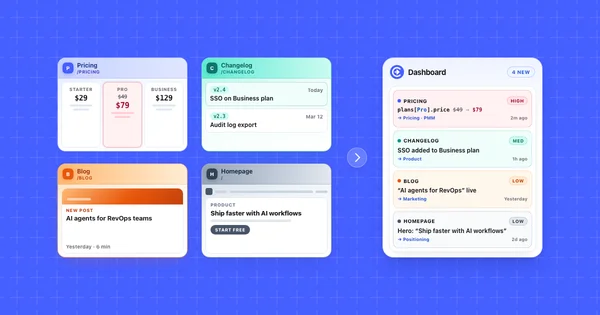
| Changelog entry shipped Tuesday | Sometimes, if the entry gets its own indexed URL | Fires. New text block on the changelog index | Fires, with the entry captured as a field |
| Homepage headline rewritten | Silent | Fires, usually alongside layout churn | Fires when the headline is a tracked field |
| Series B funding announced | Fires once coverage is indexed | Silent unless you watch their news page | Fires when a news or blog monitor covers it |
| G2 review count spikes | Rarely. Review pages update in place | Silent unless you watch that profile URL | Silent unless a monitor watches that profile |
Read the bottom two rows carefully. Google Alerts wins the funding row outright, and nothing here wins the review row unless you name the URL yourself. No single layer covers the board.
When Google Alerts is the right tool
Google Alerts is the right tool when the thing you need to know about gets published somewhere as new content. Press coverage, funding rounds, executive hires, conference talks, and third-party reviews all fit that shape, and Alerts handles them at zero cost.
Four situations where Alerts alone is genuinely enough:
- You only need mentions. If the question your team asks is "is anyone writing about us or them," a keyword alert answers it. Buy nothing. That includes not buying Competiflow.
- You track one or two rivals and already know their pages. Opening two pricing pages on the first Monday of the month takes four minutes and beats configuring anything. The math shifts around the fourth competitor.
- Your budget is actually zero. A free layer that runs beats a paid layer somebody keeps meaning to set up.
- You are watching a category, not a company. When you do not yet know which URLs matter, keyword alerts on a market term surface the players.
There is a reasonable version of competitive intelligence that is five Google Alerts, a calendar reminder, and a shared doc. Plenty of teams should run that instead of evaluating tools. The signal that you have outgrown it is specific: someone learned about a competitor's move from a customer, and the move happened on a page you could have watched.
Google Alerts vs page change monitoring vs structured monitoring
The three approaches answer three different questions: who is publishing about a company, whether a specific URL changed at all, and what changed on a competitor surface and whether it matters.
| Dimension | Google Alerts | Page change monitoring | Structured monitoring |
|---|---|---|---|
| Watches | Google's index, for a keyword | One URL you name | Competitor surfaces found from a homepage |
| Fires on | A new indexed result | Any diff in the watched region | A diff in an extracted field |
| Catches silent edits | No | Yes | Yes |
| Typical noise | Syndicated duplicates, irrelevant name matches | Cookie banners, carousels, layout churn | Fields outside the schema produce nothing |
| What you receive | A link and a snippet | A highlighted region or text diff | Field name, old value, new value, severity, summary, why it matters |
| Setup you maintain | Query strings | A URL list, selectors, ignore rules | One homepage URL per competitor |
| Cost | Free | Free tiers or self-hosting; entry paid plans $8.99 to $15 a month (October 2026) | Monthly check allotments, from $19 a month (October 2026) |
| Best fit | Mentions, news, funding | Any arbitrary URL, including odd ones | Pricing, changelog, docs, positioning |
Page change monitoring is the layer most teams are missing. Visualping, Distill, and changedetection.io all watch a URL you name and tell you when it moved. As of October 2026, entry paid plans are $8.99 a month for hosted changedetection.io, $14 a month for Visualping Personal billed monthly ($10 billed annually), and $15 a month for Distill Starter. The roundup of competitor monitoring tools for SaaS compares them properly.
Structured monitoring narrows the comparison to named fields. Instead of "something in this area changed," the record says the Team plan price moved from $49 to $39 and a usage rate line was added. That shape is what keeps a change feed readable six months in, and it is what the Changes API returns.
Build a layered competitor monitoring stack
The stack that survives contact with a real team has three layers: keyword alerts for what the world publishes, page monitoring for URLs you name by hand, and structured monitoring for the surfaces that drive pricing and positioning decisions. Each layer covers a failure mode of the one below it.
Layer 1: keyword alerts, free. Google Alerts on brand names, funding language, and comparison queries, routed to RSS so it stays out of your inbox. This layer catches the outside world talking about your market, and you never turn it off.
Layer 2: page monitoring, cheap. A page change monitor pointed at the odd URLs no discovery process would guess. A regulator's compliance page, a competitor's job board, a partner directory you appear in, a status page for a vendor you resell. Expect five to fifteen URLs and some selector upkeep after redesigns.
Layer 3: structured monitoring, for the surfaces that change decisions. This is where Competiflow fits. You add a competitor by homepage URL and discovery finds the pricing, changelog, docs, blog, and homepage surfaces worth watching, so nobody maintains a URL list by hand. Monitors run daily on Starter and up to hourly on Pro, and each successful page read costs one check, whether or not the page changed. Changes arrive as field-level diffs with a severity and a plain summary, which is what makes filtering possible before a person sees anything.
Route each layer somewhere different. Layer one goes to a feed reader somebody skims, layer two to a low-priority channel, layer three by severity so a high-severity pricing move reaches a person the same day. One channel for all three guarantees the whole thing gets muted by month two. When you add layer three, adding a competitor from a homepage URL and tuning monitors per surface is the usual starting point.
Common mistakes when teams outgrow Google Alerts
Teams outgrow Google Alerts in a predictable order, and the same five mistakes show up on the way out.
1. Reading silence as stillness. An empty inbox means Google indexed nothing new matching your query. It says nothing about whether a competitor shipped, repriced, or repositioned. Treat silence as uninformative until you have a layer that watches URLs.
2. Setting everything to as-it-happens. Five competitors on immediate delivery produces a stream nobody reads by week three. Reserve it for funding and acquisition language, where a few hours of lead time occasionally matters.
3. Running unquoted, unfiltered queries. A competitor named with common words floods the channel, and the natural response is to mute the alert instead of tightening the query. Check the Alert preview under the query box before saving it.
4. Never pruning the alert set. Alerts accumulate and nobody owns them. A year later the account holds forty queries, six for competitors that no longer exist, and nobody reads the daily digest anymore.
5. Replacing layer one instead of adding to it. A team that buys a monitoring tool and deletes its Google Alerts throws away the only layer that catches press coverage and funding news. Keep the free layer and let the paid layer cover the pages. Google Alerts for competitor monitoring handles the mention-detection job well; what it cannot do is read the page itself. If a weekly rollup is what your team actually reads, one digest across everything beats three separate inboxes.
Frequently Asked Questions
How do I set up Google Alerts for a competitor?
Go to google.com/alerts, enter the competitor's name in quotation marks, click Show options to set How often, Sources, Language, Region, How many, and Deliver to, then click Create Alert. Add companion alerts for pricing coverage, funding news, and a site: query against their domain.
Does Google Alerts detect website changes?
No. Google Alerts detects newly indexed content matching a keyword, not changes to pages already in the index. If a competitor edits their pricing page at the same URL, no alert fires. Catching that requires a monitor that reads the URL directly.
Is Google Alerts free?
Google Alerts is free and has no paid tier, delivered by email or RSS at no cost. The real constraint is coverage: it sees only what Google indexes.
Can Google Alerts monitor a competitor's pricing page?
Not reliably. A pricing page URL is usually already indexed, so an edit to the prices on it produces no new search result and no alert. Watching the price itself needs a tool that reads the page on a cadence and compares values.
Why am I not getting any Google Alerts?
The usual causes are a query too narrow to match newly indexed content, "Only the best results" filtering out the long tail, or a Region or Language setting excluding your sources. Google's own checklist adds being signed in to the wrong account, alerts that were disabled (click Enable), a full inbox, and alert emails landing in spam. If you use Gmail, add googlealerts-noreply@google.com to your contacts.
How often should Google Alerts run?
At most once a day suits nearly every competitor query. Save as-it-happens for funding, acquisition, and outage language where lead time changes what you do. Weekly works for slow-moving queries like comparison and review content.
What are the best Google Alerts alternatives for competitor monitoring?
It depends which gap you are closing. For watching specific URLs, page change monitors like Visualping, Distill, and changedetection.io cover arbitrary pages. For competitor surfaces with field-level diffs and severity, structured monitoring fits better.
Do I need to replace Google Alerts if I buy a monitoring tool?
No, and you probably should not. Keyword alerts and page monitoring catch different things, and the keyword layer costs nothing to keep. Leave Google Alerts running for press and funding mentions, then point the paid tool at the pages that change your pricing and positioning decisions.
Google Alerts earns its place in a competitive intelligence stack. It is free, it configures in minutes, and it reliably surfaces the funding round you would otherwise miss. The failure is not the tool. It is the assumption that a quiet inbox means a quiet market.
Over a year, the changes that move a roadmap or a price sheet usually happen in place, on pages indexed long before you started watching. A plan tier gets restructured. A limits table in the docs gains a metering line. A homepage headline shifts from one buyer to another. None of those create a new indexed URL.
Keep layer one, add a layer that reads the pages, and give it a triage owner. Setup takes an afternoon. Upkeep is a few minutes a week.