
Your competitor changed pricing last Tuesday. You found out Friday, from a prospect who asked why your mid-tier plan costs more than theirs.
That gap is what competitor monitoring closes. It gives you a repeatable way to catch the rival moves that matter while you still have time to respond, so the news does not reach you secondhand from a prospect on a call.
This guide defines competitor monitoring for B2B SaaS teams: what it is, how it differs from competitive intelligence and generic website alerts, what surfaces to watch, and where structured field-level monitoring fits.
What you'll learn
- A precise definition of competitor monitoring and what it is not
- How monitoring works from scheduled checks to interpreted changes
- How monitoring, competitive intelligence, and website change detection differ
- Which competitor surfaces PMMs, founders, and RevOps actually watch
- Why pixel and raw HTML diffs create alert noise
- How Competiflow implements structured monitoring (without a dashboard habit)
- Common setup mistakes and how to avoid them
TL;DR: Competitor monitoring (also called competitive monitoring) is the ongoing practice of watching rival websites and product surfaces, then routing each interpreted change to the team that owns the response. Good monitoring extracts structured fields (prices, plan names, headlines), diffs only alertable changes, and attaches evidence so someone can verify a move before it reaches sales.
What is competitor monitoring?
Competitor monitoring is the ongoing practice of watching rival websites and product surfaces, catching the changes that matter, and routing each one to whoever owns pricing, positioning, or sales. Some teams call this competitive monitoring or competitor tracking; the names differ but the job stays the same.
That makes it narrower than competitive intelligence, which is the analysis and decision layer built on top, and sharper than generic website change detection, which fires on any pixel shift whether or not it means anything.
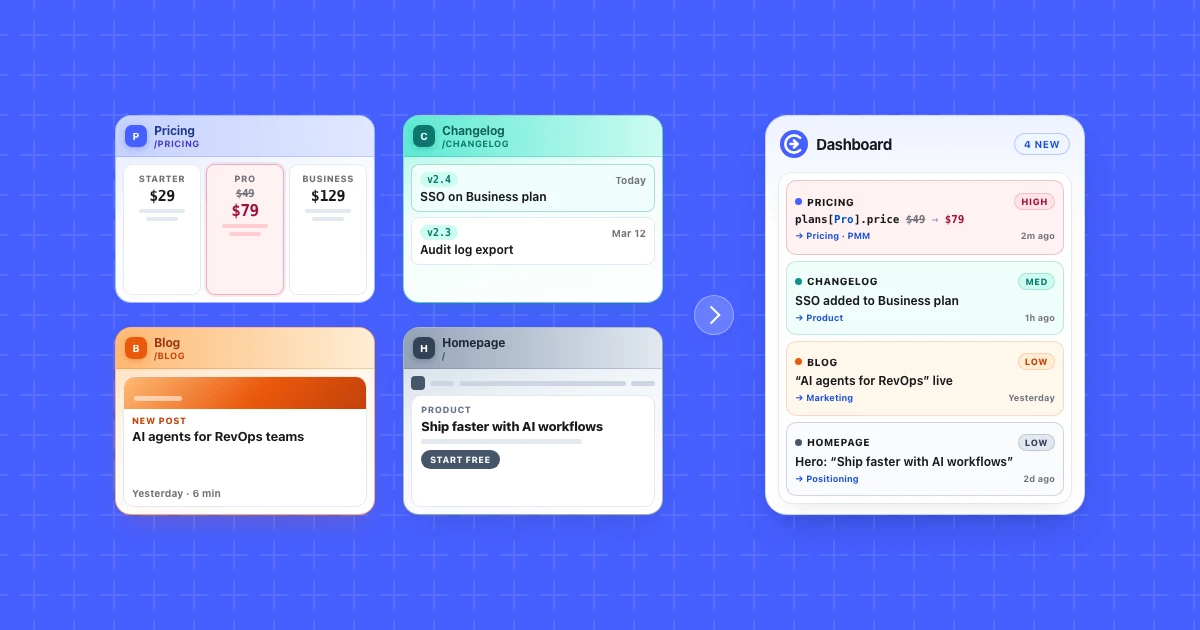
The core loop is simple: point monitors at competitor surfaces, run scheduled checks, diff normalized fields against the last snapshot, and deliver interpreted changes with severity, summary, and evidence to whoever triages pricing moves, launch pages, or homepage copy.
Teams that do this well treat monitoring as infrastructure. PMMs get pricing rows without opening ten tabs. Founders hear about a rival repositioning before the next board prep. RevOps sees battlecard inputs stay current because the feed shows what changed, not just that something blinked on a page. Those changes feed directly into artifacts like a competitive matrix that tracks how you compare on the criteria buyers weigh.
How competitor monitoring works
Competitor monitoring works in four layers: surfaces, checks, diffs, and delivery.
1. Surfaces. You choose what to watch: pricing pages, changelogs, documentation, homepages, blogs, or other public URLs where rivals announce moves. Discovery can seed these from a competitor homepage so you are not hand-maintaining URL lists forever.
2. Checks. On a cadence (daily, weekly, or faster on paid plans), the system reads each monitored page. One successful read costs one check whether or not the page changed. Checks are the metered unit; monitors are the configuration.
3. Diffs. The system compares normalized fields to the previous snapshot. A price row change, new plan tier, or headline rewrite becomes an alertable diff. Cookie banners, timestamps, and layout jitter should not.
4. Delivery. Interpreted changes land in a feed, digest, API, or agent tools. Each change typically includes what changed, why it matters, severity, and evidence you can inspect. Triage (acknowledge, dismiss, escalate) keeps the inbox honest.
That pipeline is what separates monitoring from bookmark hygiene. Software reads each page on cadence, extracts the fields that matter, and queues the real diffs for review, so nobody spends Monday re-reading ten tabs by hand.
Competitor monitoring vs competitive intelligence vs website change detection
These terms overlap in marketing copy. In practice they describe different layers of the same problem.
| Layer | Question it answers | Typical output | Time horizon |
|---|---|---|---|
| Website change detection | Did this page change? | Raw or visual diff, email alert | Event |
| Competitor monitoring | Did a rival move that matters to us? | Interpreted change on pricing, positioning, or product surfaces | Continuous |
| Competitive intelligence (CI) | What should we do about the market? | Battlecards, win/loss themes, strategic recommendations | Periodic analysis |
Website change detection is the sensor. Competitor monitoring adds field selection, interpretation, and routing. Competitive intelligence consumes those signals (plus win/loss calls, analyst reports, and primary research) to inform strategy.
A pixel monitor that emails you whenever any DOM node shifts is change detection. A platform that says "Team plan moved from $49 to $79 per month" with severity and evidence is monitoring. A PMM workshop that turns three pricing moves into a repositioning memo is intelligence work.
Enterprise CI suites (Klue, Crayon, and similar) often bundle all three. Lightweight monitoring tools focus on the feed layer and push interpretation closer to the user through digests and APIs instead of a standalone analyst dashboard.
What teams monitor on competitor websites
Most B2B SaaS teams watch a small set of high-signal surfaces per rival.
| Surface | Why it matters | Example signal |
|---|---|---|
| Pricing | Direct ARPU and packaging pressure | New tier, price increase, feature gate move |
| Changelog / release notes | Feature parity and launch timing | API addition, enterprise feature GA |
| Documentation / API reference | Integration and platform bets | New endpoint, deprecated SDK |
| Homepage / product pages | Positioning and ICP shifts | Headline rewrite, new vertical focus |
| Blog / content | SEO and narrative direction | Comparison post, category creation |
You do not need every surface on day one. Start with pricing and homepage for your top rival, add changelog when launches matter to your roadmap, add docs when you sell to technical buyers.
Competiflow discovery seeds monitors from a homepage URL so you are not guessing paths. You can pause or adjust monitor types per competitor when a surface stops earning its checks.
Why competitor alerts get noisy (and how structured monitoring helps)
Most alert noise comes from diffing the wrong layer of the page.
Pixel and screenshot diffs fire when cookie banners, chat widgets, A/B test buckets, or hero images shift. The alert is real (the pixels changed) but irrelevant to pricing or positioning.
Raw HTML diffs catch every attribute tweak, script tag, and timestamp string. Modern pricing pages are JavaScript-heavy; the HTML churns even when the plan card humans care about did not move.
Structured field-level monitoring extracts normalized values first, then diffs those fields. If the Team plan price stays $79 and the headline stays the same, you should not get an alert because an analytics script reordered.
Here is what a structured change looks like when only the price moves, using Competiflow's interpreted field_diffs shape:
{
  "summary": "Team plan raised from $49 to $79/mo",
  "severity": "high",
  "field_diffs": [
    {
      "op": "updated",
      "change_type": "price_increase",
      "path": "plans[Team].price",
      "tier": "alertable",
      "old": { "price": "$49/mo" },
      "new": { "price": "$79/mo" }
    }
  ],
  "source_url": "https://competitor.example/pricing"
}
A pixel monitor would have fired on that same page when the cookie banner reflowed. This diff fires only because a plan row moved, and it hands you the old and new value as evidence instead of a screenshot to squint at.
That is the difference between "something changed" and "something worth a human minute." Interpretation adds the next layer: severity (is this pricing or cosmetic?), plain-language summary, and why it matters so triage takes seconds instead of opening DevTools.
For the mechanics behind field diffs and false positives, see how changes are stored and reviewed in Competiflow.
Who uses competitor monitoring?
Different roles consume the same feed for different decisions.
Product marketing (PMM) watches pricing, packaging, and homepage copy. A mid-market rival adding an enterprise tier is a positioning input, not just a sales anecdote.
Founders and general managers watch fewer rivals more closely. They care about existential moves: pricing resets, category pivots, aggressive free tiers.
RevOps and sales enablement need verified snippets for battlecards. Monitoring supplies dated evidence; enablement turns it into talk tracks.
Product and engineering watch changelogs and docs when integrations or feature parity drive the roadmap.
Engineers evaluating tools care about API access, MCP/agent workflows, and reliability on JS-heavy pages. Implementation detail lives in the agent monitoring guide, not in this definition post.
One workspace can serve multiple roles if interpretation and severity filter noise before it reaches Slack or a digest.
How Competiflow approaches competitor monitoring
Competiflow is structured competitor monitoring: extract-then-diff on normalized fields, interpretation included, evidence attached.
Workspaces group competitors for one product or market. Discovery finds pricing, changelog, docs, and other monitor-worthy URLs from a homepage. Monitors run on cadence against specific surfaces. Checks read pages and produce field-level diffs. Changes bundle interpretation (summary, severity, why it matters). Digests batch recent activity so you review signal, not a notification flood.
Usage is metered in checks, not seats. Adding a rival does not require a procurement conversation; you pay for pages read.
Competiflow is not a fit when you need a full enterprise CI program with analyst services, or when you only want arbitrary pixel diffs on internal pages with no interpretation layer. Visual monitors and enterprise suites solve different jobs; we say so on purpose.
If you want to connect monitoring to an AI agent in your editor, follow the MCP setup guide. If you want API-first automation, start with the API quickstart.
Common mistakes when monitoring competitors
Monitoring too many URLs too soon. Ten rivals times five surfaces equals fifty streams of noise. Start with one competitor and two surfaces, prove triage works, then expand.
Treating every alert as urgent. Severity exists so medium cosmetic changes do not sit in the same queue as pricing. Acknowledge or dismiss so the feed reflects what still needs judgment.
Skipping evidence. "Something changed on pricing" without a field diff is homework for whoever receives the Slack ping. Insist on evidence before sharing with sales.
Confusing monitoring with strategy. A feed tells you what moved. It does not tell you whether to match a price cut. Reserve strategic calls for humans; automate detection and first-pass interpretation.
Letting tools die in a dashboard. If nobody opens the CI portal daily, push monitoring into email digests, APIs, or agent tools your team already uses. Adoption beats feature count.
Using the wrong diff layer. Pixel monitors on dynamic pricing pages train teams to ignore alerts. Match the diff method to the surface.
Frequently Asked Questions
What is competitor monitoring?
Competitor monitoring is the continuous practice of watching rival websites and product surfaces (pricing, changelogs, docs, homepages) for meaningful updates. Effective monitoring filters noise, interprets why a change might matter, and routes evidence to the teams who must respond.
What is competitive intelligence?
Competitive intelligence is the broader discipline of turning competitor and market signals into decisions for product, marketing, and sales strategy. Monitoring supplies the change feed; intelligence is the analysis, prioritization, and action built on top of it.
What is the difference between competitor monitoring and competitive intelligence?
Competitor monitoring asks what changed on rival surfaces and whether it matters. Competitive intelligence asks what the team should do about the market. Monitoring is continuous and surface-specific; intelligence is interpretive and strategic, often on a quarterly or deal-driven cadence.
How does competitor monitoring work?
You configure monitors on competitor URLs, run scheduled checks that extract structured fields, diff alertable changes against the last snapshot, and deliver interpreted updates with severity and evidence through a feed, digest, API, or agent tools.
How do I monitor competitor pricing?
Add the competitor's pricing page (or homepage so discovery can find pricing), set an appropriate cadence, and filter changes by monitor type and severity. Field-level diffs on plan names and prices reduce noise from layout churn. See monitors for cadence and filter settings.
Why monitor competitors?
Rivals adjust pricing, packaging, and positioning without waiting for your planning cycle. Monitoring closes the lag between their move and your response so product, sales, and leadership decide from current signal instead of stale anecdotes.
What is website change detection?
Website change detection notices that a page differed from its previous version, often via pixels, screenshots, or raw HTML. It answers "did something change?" Competitor monitoring adds field selection, interpretation, and routing so alerts reflect business-meaningful moves.
How do I reduce competitor alert noise?
Prefer structured field diffs over pixel or raw HTML diffs, filter by severity, triage with acknowledge/dismiss workflows, and batch low-urgency updates into digests instead of instant pings for every cosmetic shift.
How do you monitor competitors?
You monitor competitors by pointing scheduled checks at their public pages (pricing, changelog, homepage), extracting normalized fields from each snapshot, diffing those fields against the previous version, and reviewing only the changes that moved something real. Most teams start with one rival and two surfaces, then expand once triage keeps up. Tools range from visual monitors to structured platforms like Competiflow that interpret diffs automatically.
What is competitive monitoring?
Competitive monitoring is another name for competitor monitoring. Both describe the practice of tracking rival pricing, positioning, and product changes on a cadence rather than checking manually. The term appears more often in enterprise contexts where the scope covers market dynamics beyond a single rival, but the underlying workflow (check, diff, interpret, route) is the same.
Treat competitor monitoring as infrastructure your team relies on every week. Define the surfaces worth watching, diff the fields that drive decisions, and deliver interpreted changes where your team already works.
When you are ready to implement monitoring with an agent, read How to Monitor Competitors with AI Agents. For a breakdown of tools by category, see the best competitor monitoring tools for SaaS. To try structured monitoring on one rival, start free and follow the quickstart.