
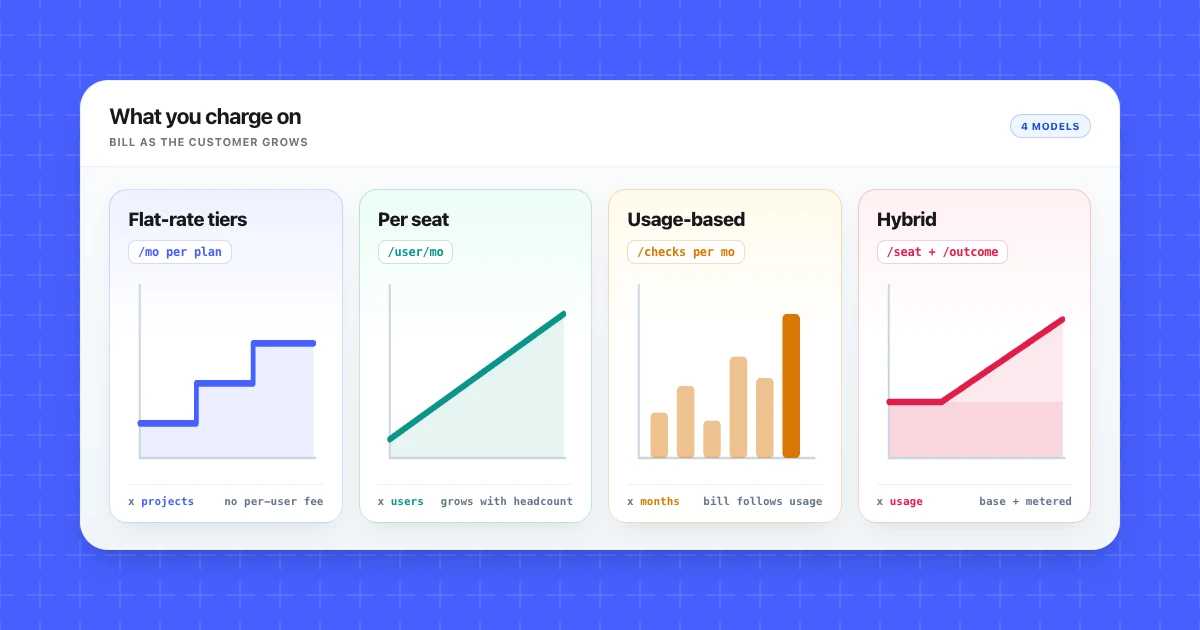
Linear and Basecamp both sell software to teams, and their pricing pages look nothing alike. As of October 2026, Linear charges $10 or $16 per user per month, billed yearly. Basecamp's four paid plans run from $29 to $199 a month (the top one billed annually), charge "no per-user fees", and step up by projects, storage, and a user cap instead.
The two companies charge on different things, and that choice shapes every bill a customer will get. If you're choosing a pricing model, the most useful evidence is already public: your competitors' pricing pages.
In this guide we'll go through six SaaS pricing models on real pricing pages, then run a four-step method for choosing yours.
What you'll learn
- How a pricing model differs from a pricing strategy
- Six SaaS pricing models, each shown on a real pricing page from October 2026
- A four-step method for choosing a model, a value metric, and plan gates from competitors' pages
- When to publish prices and when to send buyers to sales
- What a rival's pricing page can't tell you
TL;DR: Pick your value metric first: the unit that grows as customers get more value. Then read three to five competitor pricing pages into one dated worksheet that records each rival's metric, entry price, free tier, and plan gates. Decide where to match the market and where to differ, and put tier limits where customers naturally outgrow a plan.
What a SaaS pricing model is, and how it differs from a pricing strategy
A SaaS pricing model is what you charge on and how the bill is built: a flat fee, a price per seat, a price per unit of usage, or tiers that bundle limits together. A pricing strategy is how you set the price level inside that model.
Linear makes the split easy to see. Its paid plans are priced per user, so per seat is the model. Deciding that Basic costs $10 per user a month, billed yearly, is strategy. Linear could double that number tomorrow and keep the same model.
The unit at the center of a model is the value metric: the thing a customer pays more for as they use more, such as seats, projects, checks, or requests. A good value metric grows with the value the customer gets.
A few common strategies set the level:
- Value-based pricing sets the price from what the product is worth to the customer, learned through interviews.
- Cost-plus pricing adds a margin to what it costs you to serve an account.
- Competitor-based pricing sets your level against what rivals publish, which only works if you keep track of competitor pricing pages.
Changing the model, say from seats to usage, changes every customer's bill, so it's the harder decision to reverse and the subject of this guide.
SaaS pricing models compared
The six rows below cover every pricing page in this guide. Two of them, tiers and freemium, are layers that sit on one of the other four, which is why most real pages combine rows. The risk column is our own judgment of how each model tends to go wrong.
| Model | You charge on | Fits | Example (Oct 2026) | Main risk |
|---|---|---|---|---|
| Flat-rate | One fee per plan, no per-user fee | Teams that want a predictable bill | Basecamp | Large accounts can pay what small ones pay |
| Per-seat | Each user | Products every user works in | Linear, Figma | Customers tend to ration seats |
| Tiered (good-better-best) | Named plans with rising limits | Distinct small, mid-size, and large buyers | Basecamp, Linear, Competiflow (our own product) | Badly placed gates can push buyers down a tier or out |
| Usage-based | Units consumed, such as checks | Products where consumption tracks value | Visualping, Competiflow | Bills are harder to predict |
| Freemium | A permanent $0 entry tier | Products that spread user to user | Linear Free, Vercel Hobby | Free users who never convert still cost money |
| Hybrid | A seat or base fee plus metered usage | Steady and spiky usage at once | Intercom, Vercel, Figma | Hard to explain on one page |
Basecamp is flat-rate and tiered. Linear is per-seat and tiered, with a freemium entry plan.
Flat-rate, per-seat and tiered pricing, with examples
Flat-rate, per-seat, and tiered pricing all give the buyer a fixed bill they can read before signing.
Flat-rate pricing
Flat-rate pricing charges one fee for the plan, with no per-user line on the bill. As of October 2026, Basecamp's page says "no per-user fees" at every paid tier, and the plans step up by projects, storage, and a user cap:
- Freelancer: $29/mo, 3 projects, 10 GB, up to 5 users
- Pro: $79/mo, 8 projects, 25 GB, up to 10 users
- Pro Plus: $99/mo, 12 projects, 100 GB, up to 15 users
- Pro Unlimited: $199/mo billed annually, unlimited projects and users
So Basecamp isn't one price for everyone. It's flat inside a tier and tiered on projects, storage, and headcount bands: the sixth user on Freelancer moves you to Pro, but never adds a per-user charge.
Per-seat pricing
Per-seat pricing charges for each user. Linear's Basic is $10 and Business is $16 per user/month, billed yearly. The bill grows with headcount, which tracks value well when every user works in the product daily.
The weak spot is the occasional user. A team is unlikely to buy a full seat for someone who comments on a design twice a month. Figma prices by seat type instead. On its Professional plan, a Full seat is $16/mo, a Dev seat $12/mo, and a Collab seat $3/mo. Organization Full seats are $55/mo and Enterprise Full seats $90/mo, billed annually.
Tiered pricing and good-better-best plans
Tiered pricing bundles limits into a few named plans at rising prices. Good-better-best is the familiar three-plan version. The real decision is what each tier gates on, because that limit is what makes a customer upgrade:
- Basecamp gates on projects, storage, and users.
- Linear Free gates on teams and issues (2 teams, 250 issues, unlimited members).
- Visualping gates on monthly checks and users (1 user on Free, 5 on Business 20K).
- Competiflow gates on checks, monitored pages, workspaces, and how often pages are checked.
Usage-based, hybrid and freemium pricing, with examples
Usage-based and hybrid pricing tie the bill to consumption, entirely or as a line added to a fixed fee. Freemium adds a $0 entry plan on top of either, or on top of a fixed model.
Usage-based pricing
Usage-based pricing charges per unit consumed, which fits when consumption follows value. Visualping tiers its plans by monthly checks. As of October 2026, Free includes 150 checks, Personal 1K is $14/mo or $120/yr, Personal 5K is $35/mo, Personal 10K is $70/mo, and Business 20K is $140/mo.
Competiflow, our own product, prices this way: one check covers one page (how checks are billed). Starter is $19/month for 2,000 checks, Growth $49/month for 5,000, and Pro $99/month for 10,000. In both cases the buyer has to estimate their checks before choosing a plan.
Hybrid pricing
A hybrid pricing model combines a fixed part with a metered part:
- Intercom charges per seat plus "From $0.99 per Fin outcome". Essential is $29 per seat/mo, shown with a $19 new-customer price; Advanced is $85 and Expert $132 per seat/mo.
- Vercel Pro is $20/mo including "$20 of included usage credit", then metered line items, for example "starting at $0.50 per 1M allowed requests" beyond the included amount.
- Figma bundles monthly AI credits with each seat: 3,000 with a Professional Full seat, 500 with a Dev or Collab seat.
- Notion sells AI usage as an add-on to its plans, at "$10 per 1,000 monthly Notion credits".
Freemium
Freemium is a permanent $0 plan next to paid ones, and it works as an entry tier on top of another model. Linear Free is $0 with unlimited members, capped at 2 teams and 250 issues. Visualping Free and Vercel Hobby are $0 too.
A free trial is a different thing. Competiflow's trial gives you 100 checks with no credit card, and then you pick a paid plan. The freemium model pays off when free users bring paying ones in. Free users who never upgrade are a running cost.
How to choose a SaaS pricing model using competitors' pricing pages
Choose the value metric first, then use three to five competitor pricing pages to decide where to match the market and where to differ.
1. List candidate value metrics
Write down every unit you could charge on: seats, projects, checks, requests, outcomes, documents sent. For each one, ask whether it grows as the customer gets more value. Seats pass when every user works in the product and fail when a few people do the work while many only watch. Usage units fail when usage jumps for reasons the customer can't control.
2. Read 3 to 5 competitor pricing pages into one worksheet
Put each rival in a row of one worksheet, the same structure as a competitor comparison matrix, limited to pricing columns: value metric, entry price, free tier or trial, what gates each tier, published prices or contact sales, and the date captured.
3. Decide where to match and where to differ
If every rival charges per seat, buyers will compare your seat price with theirs line by line. Matching the metric makes you easy to compare. A different metric becomes a positioning choice you'll have to explain on your page. Basecamp's page shows what that looks like: "no per-user fees" on every paid plan, with Pro Unlimited going to unlimited users, which puts the difference from per-seat tools in plain view.
4. Set plan gates where your upgrade trigger is
An upgrade trigger is the moment a customer outgrows a plan: a fourth project, a sixth user, a second team. Put the tier limit there, then check where rivals put theirs. If a rival gates something your buyers expect in the entry plan, leaving it ungated gives sales an easy point to make.
A hypothetical worksheet
Here's the method on a made-up case. Everything below is hypothetical: a proposal tool for agencies, compared against three fictional rivals.
Hypothetical worksheet: fictional rivals and invented prices
| Product | Value metric | Entry price | Free tier or trial | Gates |
|---|---|---|---|---|
| Rival A | Per user | $15/user/mo | Free for 1 user | Users; enterprise behind sales |
| Rival B | Per user | $25/user/mo | 14-day trial | Users |
| Rival C | Flat fee | $149/mo, unlimited users | None | 100 sent proposals/mo |
| Your product | Proposals sent | Set later | To decide | Proposals sent; users unlimited |
Two of the three rivals charge per seat. Agencies add freelancers in busy seasons, so a seat price punishes them exactly when they're growing. Value tracks proposals sent, which Rival C already caps. That points to tiers on proposals sent, with unlimited users as the visible difference from Rivals A and B. The price level is a strategy question for afterward.
Pricing pages change after you've chosen, so date the worksheet and reread it before each pricing review. Competiflow can watch those pages and record what changed; setting up monitors shows how to point it at a rival's pricing page.
Publish your prices or send buyers to sales
Price visibility is a packaging decision too, and the pricing page examples in this guide show three versions of it. As of October 2026:
- A full price list. Basecamp publishes every plan's price, so buyers can choose on their own and compare you line by line.
- A floor price. Visualping's Solutions tier reads "As of $3,000/yr, Talk to sales", and Intercom lists "From $0.99 per Fin outcome". The buyer sees where the price starts.
- No price. Crayon asks you to "Request an Estimate", Klue doesn't publish prices, and Intercom's Fin-only option says "No seats required" and sends you to sales.
A rival's contact-sales tier shows where it expects to negotiate, and that's the part of the market your worksheet can't price.
Where a rival's pricing page misleads you
A pricing page shows the list price and the model. It can't show what customers pay or whether the model works.
- The list price isn't always the price paid. Intercom shows a $19 new-customer price next to its $29 Essential seat, and Visualping's Personal 1K is $14/mo or $120/yr.
- Contact-sales tiers hide the top of the market. For Crayon and Klue, your price cells stay empty.
- A page won't tell you a rival's conversion rate or how many customers leave after the first invoice.
- Copying a rival's value metric copies its positioning.
- In a new category there may be nothing comparable, so customer interviews and value-based pricing work carry the decision.
And if you have two rivals and review pricing once a quarter, a calendar reminder to reread their pages beats automated monitoring.
Pricing is one dimension; benchmarking against competitors puts it next to product depth and positioning before you decide.
Frequently Asked Questions
What is the most common SaaS pricing model?
Tiered plans are the most common pattern on the pricing pages reviewed here: Basecamp, Linear, Intercom, Visualping, Figma, Vercel, and Competiflow all publish named tiers, and most combine them with a seat or usage metric.
What is the difference between a pricing model and a pricing strategy?
A pricing model is what you charge on and how the bill is built. A pricing strategy is how you set the price level within that model, from customer value, your costs, or rivals' prices.
What is value-based pricing?
Value-based pricing sets the price from what the product is worth to the customer, which you learn through interviews and willingness-to-pay research. It's a strategy, so it can sit on any pricing model.
What is tiered pricing?
Tiered pricing sells the same product as a few named plans, each with a higher price and a higher limit on something specific: Basecamp on projects, storage, and users, Linear Free on teams and issues.
What is flat rate pricing?
Flat rate pricing charges one fee for a plan, with no per-user line on the bill. As of October 2026, Basecamp runs from $29/mo for Freelancer (up to 5 users) to $199/mo, billed annually, for Pro Unlimited (unlimited users).
What is freemium?
Freemium is a permanent free plan next to paid ones, with limits that move heavier users to upgrade. Linear Free, Visualping Free, and Vercel Hobby all cost $0.
What is the difference between freemium and a free trial?
Freemium has no end date, only limits. A free trial gives limited time or usage before you pay. Linear Free never expires but caps you at 2 teams and 250 issues. Competiflow's trial gives you 100 checks with no credit card.
What is competitive pricing?
Competitive pricing is a strategy that sets your price level against rivals' published prices. It decides the number, so it works with any pricing model.
Pick the value metric first, then fill the worksheet with three rivals' pricing pages and date every row.
If you'd like those pages watched after you've chosen, start a Competiflow trial and add your rivals to one workspace.