
Most competitive benchmarks get built once. Someone spends a week before a pricing review or a board meeting filling a spreadsheet with rival prices, feature checkmarks, and homepage screenshots. The deck goes out and the spreadsheet is never opened again. Six months later a rival has moved SSO into a cheaper plan, and nobody on the team knows.
The method in those spreadsheets is usually fine. The trouble is that a benchmark is a snapshot of pages that keep changing. This guide covers competitive benchmarking for a SaaS product from public pages: how to build the scorecard, how to compare prices that are packaged differently, and how to keep it current without rebuilding it every quarter.
What you'll learn
- What competitive benchmarking is and how it differs from a competitive analysis
- The five types of benchmarking, and the two you can run from public pages
- Six dimensions you can benchmark from public pages
- A six-step process, with a worked pricing benchmarking example
- How to turn the scorecard into a competitive gap analysis
- What a public-page benchmark can't tell you
TL;DR: Competitive benchmarking scores your product against 3 to 5 direct rivals on the same measures: price for a typical buyer, plan gating, features, release pace, and positioning. Tie it to one decision, record a source URL and date for every cell, normalize prices to one buyer scenario, and re-score a row when its source page changes.
What is competitive benchmarking?
Competitive benchmarking is measuring your product or company against direct competitors on the same set of metrics, so you can see where you lead, where you trail, and which gaps are worth closing. For a SaaS team most of those metrics are public: prices, plan limits, features, integrations, release notes, and homepage claims.
This guide sticks to the product version, the one a PMM or founder can run with public pages and a spreadsheet. Competitor benchmarking, competitive benchmarking, benchmarking competitors: same exercise.
It's easy to confuse with a competitive analysis. A competitive analysis describes your competitors: who they sell to, how they position, where they're strong and weak. A competitive benchmark measures you against them on a fixed scorecard and repeats the measurement, so next quarter you can see what moved. If you need the descriptive version first, start with our competitor analysis template.
Types of benchmarking, and the two SaaS teams run
There are five common types of benchmarking: competitive, performance, process, strategic, and functional. SaaS product teams mostly run competitive and strategic benchmarking, because public pages supply the data for both.
| Type | What it compares | SaaS example | Public data enough? |
|---|---|---|---|
| Competitive | Your product against direct rivals on the same measures | Cost for 10 users with SSO, integrations in your buyers' stack | Mostly |
| Strategic | Business model and positioning choices | Self-serve vs sales-led, who the homepage speaks to | Yes |
| Process | How work gets done | Release cadence, onboarding steps, support hours | Partly |
| Performance | Outcome KPIs | Trial-to-paid conversion, net revenue retention | No |
| Functional | A practice borrowed from another industry | Copying a fintech app's signup flow for your trial | Yes, outside your category |
Two more terms show up in this context. Internal benchmarking compares teams or regions inside your own company. External benchmarking is everything that looks outside it, which covers every row in the table.
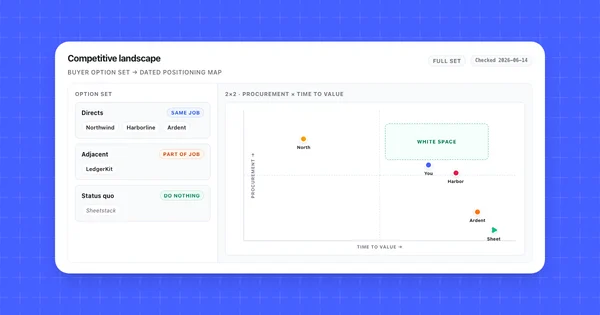
Strategic benchmarking deserves more attention than it gets. Whether a rival is product-led or sales-led, whether its homepage talks to developers or executives, whether it publishes prices at all: those choices shape every other row of the scorecard. We'd benchmark them first.
What to benchmark in a SaaS product
Benchmark what a buyer compares before they talk to sales. That comes down to six dimensions, and each has a public source and a measure you can score the same way for every competitor.
| Dimension | Where to look | What to score |
|---|---|---|
| Pricing and packaging | Pricing page, plan comparison table, pricing FAQ | Cost for your typical buyer, which features each plan gates, trial or free plan terms |
| Features and integrations | Feature pages, integrations directory, docs | Presence of the 10 to 15 capabilities your buyers ask about, integrations with the tools they already use |
| Release pace | Changelog, release notes, product blog | Entries per month, which product areas they ship in |
| Positioning | Homepage headline, subheadline, navigation | Target audience, main claim, which use cases lead |
| Proof | Customer logos, case studies, review sites | Named customers in your segment, review score and count |
| Sales motion | Signup flow, demo buttons, trial length | Self-serve or sales-led, steps to first value |
Pick the dimensions your decision needs. A pricing review needs the first row in detail and the rest as context. A roadmap review leans on features and release pace. Scoring all six at full depth for five competitors is how benchmarks stall in week two.
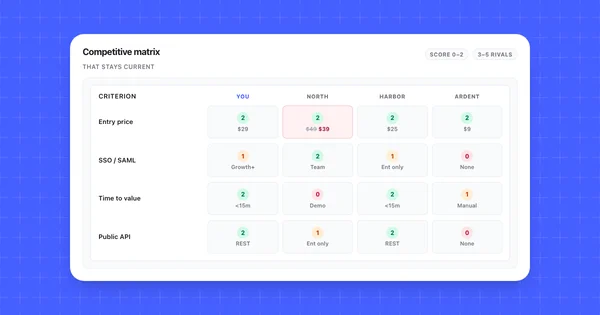
If most of your benchmark is a side-by-side feature comparison, the layout from our guide to building a competitive matrix works as the scorecard.
How to do competitive benchmarking in six steps
Here's how to do competitive benchmarking so the result is still trusted a quarter later. Two things carry most of the weight: a written rule for every metric, and a date on every cell.
1. Write down the decision the benchmark serves
Start with a question. "Should we move SSO into the Pro plan?" or "Which two integrations do we build next quarter?" The decision sets which dimensions you score and how deep you go. Without a decision, the scorecard just keeps growing.
2. Pick three to five competitors
Use your CRM. Take the rivals named most often in lost deals, add the one prospects bring up first on discovery calls, and stop at five. If you want an aspirational name, a company you'd like to be compared with in two years, give it a separate column so it doesn't skew the comparison.
3. Define each metric as a rule
Write the measurement rule before you collect anything. "Price" becomes "monthly cost for a 10-person team on the cheapest plan that includes SSO, billed annually." "Has a Slack integration" becomes a 0 to 2 score: 0 if absent, 1 if it's an add-on or in beta, 2 if it's included in the plan you're comparing. Written rules stop two people from scoring the same page differently.
4. Collect a dated baseline
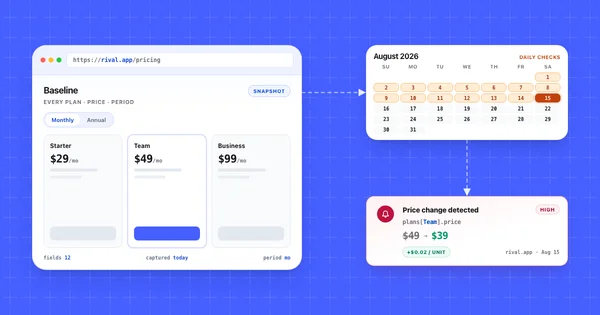
For every cell, record the value, the source URL, and the date you read it. Save a copy of the page, a screenshot or a PDF, for anything that feeds a pricing decision. A cell without a date turns into a rumor within a quarter. Someone will quote it on a sales call long after the rival has changed it.
5. Score, then compare
Fill the scorecard and put your own product in the first column, scored by the same rules. Then read across rows instead of down columns. A rival with a lower total can still beat you on the two rows your buyers care about most, so weight rows by how often they come up in deals.
6. Set a refresh trigger
Decide now when the benchmark gets updated. We'd do a full re-score at least once a quarter, and between those, re-score a single row when its source page changes. The section on keeping the benchmark current covers how.
Pricing benchmarking: normalize before you compare
Pricing benchmarking only works when you compare what the same buyer would pay at each competitor. Per-seat prices, flat tiers, add-ons, and "contact sales" buttons package the same product so differently that list prices side by side tell you very little.
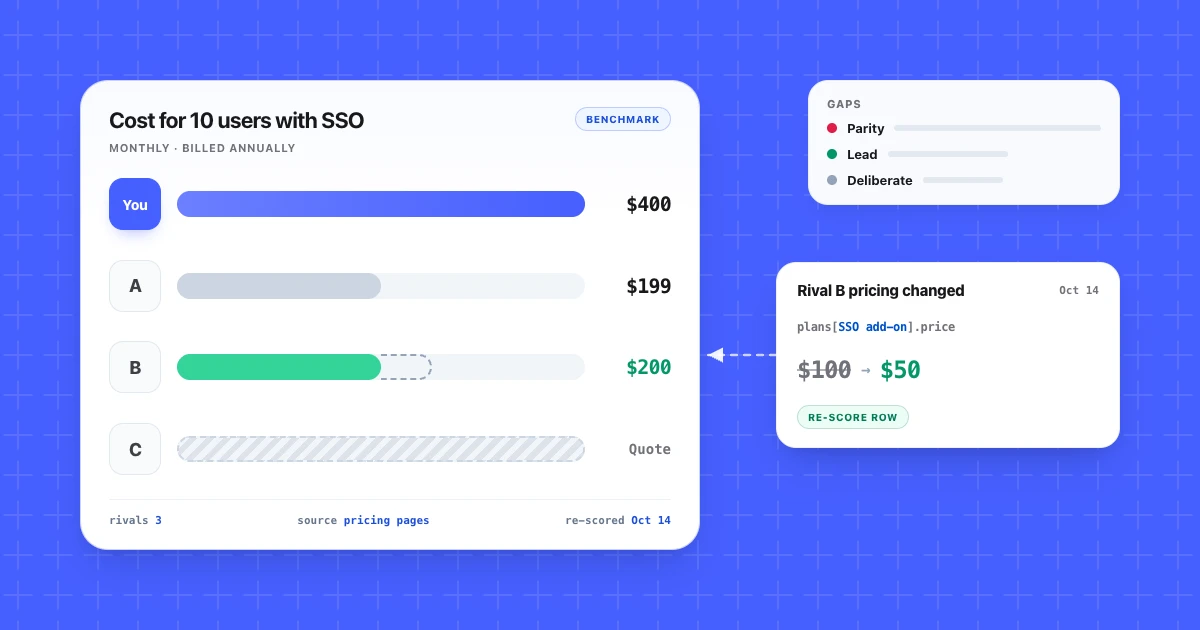
Here's a hypothetical example: your product and three rivals, benchmarked for one buyer scenario, a 10-person team that needs SSO and pays annually.
| Headline price | Where SSO lives | Monthly cost, 10 users with SSO | |
|---|---|---|---|
| Your product | $25 per user | Business plan, $40 per user | $400 |
| Rival A | $99 flat, up to 5 users | Growth plan, $199 flat, up to 20 users | $199 |
| Rival B | $15 per user | $100 a month add-on, any plan | $250 |
| Rival C | Free up to 3 users, then $30 per user | Enterprise plan only | No public price |
Hypothetical numbers for illustration.
On headline price your product sits in the middle. For the buyer who needs SSO it's the most expensive of the three with a public price, by a wide margin, and the gap comes from packaging. The per-seat price was never the problem. A sticker-price comparison would have missed that.
A few rules keep pricing benchmarks honest:
- Pick one or two buyer scenarios that match your real deals, and compute every rival against them.
- Record whether each price is monthly or annual. Some pricing pages show the annual figure by default.
- Treat "contact sales" as data. It means the rival chose a sales-led motion for that buyer, which belongs in the sales motion row of your scorecard.
- Note limits that work like prices: usage caps, seat minimums, history retention.
For the pages themselves, see how to monitor competitor pricing pages.
Turn the benchmark into a competitive gap analysis
A competitive gap analysis sorts every row where you differ from rivals into a decision: close it, use it, defend it, or ignore it. Until you do that, the benchmark only describes.
| Gap | What it looks like | What to do |
|---|---|---|
| Parity gap | Most rivals have it, you don't, and it comes up in lost deals | Roadmap candidate. Check win-loss notes before committing. |
| Lead | You have it and most rivals don't | Put it on the pricing page and in sales battlecards. |
| Deliberate gap | Rivals have it and you chose not to build it | Write the objection answer for sales and move on. |
| Noise | One rival has it and no buyer asks about it | Log it and look again next quarter. |
Parity gaps are where teams overreact. Feature parity with four rivals' homepages doesn't mean you're building what your buyers need. Check it against the loss reasons in your CRM, or better, against what buyers said in win-loss interviews.
Leads go stale too. When a rival closes one of your gaps, the claim on your competitor battlecards becomes false the same day. That's the best argument for the next section.
Keep the benchmark current
A benchmark stays current when every row is tied to a source page you monitor, so a change on that page tells you which cell to re-score. The alternative is a quarterly rebuild, which means every decision in between uses data up to three months old.
How often do those pages change? We run Competiflow on the website monitors and CI platforms we benchmark against, with daily checks on their homepages. In 2026 it recorded:
- On August 25, ChangeTower replaced its homepage headline "Monitor website changes, get alerts, archive full history" with "Website Change Monitoring for Every Change That Matters."
- On September 10, ChangeTower added a "Competitor Intelligence" feature card linking to its competitor monitoring page, and renamed "Code Monitoring" to "Compliance Monitoring."
- Klue added a "Win-Loss Clips" card to its homepage on July 30 and took it down on August 20. On September 8 it added "Deal Support."
A positioning benchmark of ChangeTower written in early August would describe a general website monitor. By mid-September its homepage listed Competitor Intelligence as one of several named solutions, next to compliance, legal, and security monitoring, and quoted a VP of Product who uses it to watch competitors' changelogs and pricing pages. If ChangeTower were on your scorecard, the main claim, the leading use cases, and the feature list would all be out of date, and a quarterly process wouldn't tell you until the next review.
Here's the August 25 change as the changes API returns it, trimmed to the fields discussed here:
{
  "change": {
    "competitor": "changetower.com",
    "monitor_type": "homepage",
    "severity": "medium",
    "source_url": "https://changetower.com",
    "field_diffs": [
      {
        "op": "modified",
        "path": "headline",
        "old": "Monitor website changes, get alerts, archive full history",
        "new": "Website Change Monitoring for Every Change That Matters"
      },
      {
        "op": "modified",
        "path": "subheadline",
        "old": "AI-powered website change monitoring. Set custom alert criteria, track website changes, and get notified about the changes you care about.",
        "new": "Watch thousands of pages. Define what counts as a change. Route each alert to the team that acts on it. Archive every version."
      }
    ],
    "evidence": {
      "captured_at": "2026-08-25T21:11:49Z",
      "previous_captured_at": "2026-08-24T21:09:45Z"
    }
  }
}
The path points at the scorecard cell to update, here the positioning row. The source_url and evidence timestamps are the URL and date you'd otherwise record by hand in step 4. Each change also carries a plain-language summary and a why_it_matters note, left out above.
For a benchmark, the setup is one workspace holding your 3 to 5 benchmark competitors, with monitors on their pricing, changelog, and homepage. Competiflow finds those pages from each competitor's homepage and checks them daily or weekly, and each page read counts as one check. You read the changes or the workspace digest, and re-score the rows that moved. The quickstart walks through creating the workspace.
If you benchmark three competitors once a quarter, a calendar reminder to reopen the source URLs every month is a reasonable alternative. Monitoring starts paying off when the competitor list or the number of pages per competitor grows.
What a public-page benchmark can't tell you
A benchmark built from public pages measures what competitors publish: prices, plans, features, and claims. It can't measure how well they execute, and the same limit applies to any tool that reads those pages, Competiflow included.
- Win rates and loss reasons. These come from your CRM and from interviews with buyers. A win-loss analysis answers why you lose to a rival, while the benchmark only shows what differs.
- Customer experience. Satisfaction and effort scores need survey-based benchmarks from research firms or CX platforms.
- Revenue, growth, and conversion. Rivals don't publish trial conversion or retention, so performance benchmarking against named competitors isn't possible from their pages. Funding announcements and job posts give rough proxies at best, and published industry surveys are a different exercise.
- Features that exist but aren't advertised. Klue taking the Win-Loss Clips card off its homepage didn't mean the product was gone. Check docs or a trial before scoring a feature 0.
If your benchmark is mostly about customer satisfaction or retention, a survey program fits better than page monitoring.
Common competitive benchmarking mistakes
Three competitive benchmarking mistakes get past even a careful process: scoring from memory, counting features instead of weighting them, and grading your own product by intent.
- Scoring from memory. A sales rep's recollection of a rival's demo ends up as a 2. Score only from a source you can link to.
- Counting features instead of weighting them. A rival with ten minor integrations wins on the total while you win on the one buyers ask about. Set the weights when you write the rules in step 3, before anyone sees the scores, so nobody tunes them toward a preferred result.
- Grading yourself by intent. Your own column gets scored on what the roadmap promises, while rivals get scored on their live pages. Score your product from your own public pages, by the same rules.
Frequently Asked Questions
What is competitive benchmarking?
Competitive benchmarking compares your product with direct competitors on a fixed set of metrics and repeats the comparison over time. In SaaS, the metrics are usually price for a typical buyer, plan packaging, features, integrations, release pace, and positioning.
What is benchmarking in business?
Benchmarking in business means comparing your performance, processes, or products against a reference point: a competitor, an industry average, or a company known for doing one thing well. Competitive benchmarking is the version where the reference point is your direct rivals.
What are the types of benchmarking?
The common types are competitive, performance, process, strategic, and functional benchmarking. There's also a split between internal benchmarking, inside your own company, and external benchmarking against others. SaaS product teams mostly run competitive and strategic benchmarking, because public pages supply the data.
What metrics should a competitive benchmark include?
Include metrics you can measure the same way for every competitor and that connect to a decision. For SaaS that's monthly cost for a defined buyer scenario, which plan gates key features, the integrations your buyers use, changelog entries per month, homepage target audience, and named customers in your segment.
What is the difference between benchmarking and competitive analysis?
A competitive analysis describes who your competitors are and how they compete. Benchmarking scores you against them on a fixed scorecard, on a schedule, so you can see what moved since the last round.
What goes in a benchmarking report?
A benchmarking report states the decision it serves, the competitors and buyer scenario, the scorecard with a source and date for every value, the gaps sorted by what to do about them, and the date of the next refresh. Keep the scorecard in a shared sheet so the report links to the live version.
Why is benchmarking important?
Benchmarking replaces opinions about competitors with numbers you can check. It shows where you trail on things buyers compare, which leads are worth advertising, and when a rival's change makes your sales claims out of date.
How often should you benchmark competitors?
Do a full re-score at least once a quarter, and update single rows when their source page changes. Homepages and pricing pages can change several times between quarterly reviews, as the ChangeTower example shows, so updates triggered by page changes catch what a fixed schedule misses.
Pick one decision coming up this quarter, three competitors, and the two dimensions that matter for it. Build the dated baseline this week, with a URL and date in every cell. Then decide how you'll find out when those pages change.
If you'd rather have pricing, changelog, and homepage changes come to you with the old and new values attached, start a Competiflow trial and add your benchmark competitors to one workspace.