
![Visualping screenshot noise versus Competiflow field diff: plans[Team].price $49 to $79 HIGH, hero.logo SKIP](/assets/blog/competiflow-vs-visualping/hero-1116248fae0f4b89efcb3f049f772e4cb0f28d475bff96c44d819e66afdd4944.webp)
Your phone buzzes at 6:12 a.m. The screenshot shows a highlighted band across the top of a competitor's pricing page, and after twenty seconds of squinting you work out that a testimonial photo rotated. The plan prices are untouched. You dismiss it, along with the four alerts from earlier in the week.
Both tools in this comparison will tell you that page changed. They disagree about what counts as a change, and that single difference decides how your week goes. This post compares Visualping and Competiflow on detection model, alert content, pricing math, coverage, and agent access, using one job as the test: catching a competitor's price move with evidence you can act on.
What you'll learn
- What each product actually detects, and where the two models diverge
- A side-by-side table on detection, alert content, coverage, pricing, and API access
- How a visual snapshot diff differs from a field-level diff, with the JSON a structured monitor returns
- What lands in your inbox during a normal week on a dynamic pricing page
- How monitored-page pricing compares to check-based pricing at realistic volumes
- The three cases where Visualping is the better tool, and a verdict matrix for the rest
TL;DR: Visualping compares rendered screenshots of a page, so a price cut and a moved cookie banner both start as an image difference. Competiflow parses pricing pages into named fields and alerts only when a tracked value moves. Choose Visualping for cheap breadth across static pages, Competiflow when you want pricing changes a person or an agent can read directly.
What Competiflow and Visualping each do
Visualping is a general website change monitor built on visual comparison. Competiflow is a competitor monitoring tool that extracts pages into structured fields before comparing them. Same category on the surface, different unit of detection underneath.
Visualping
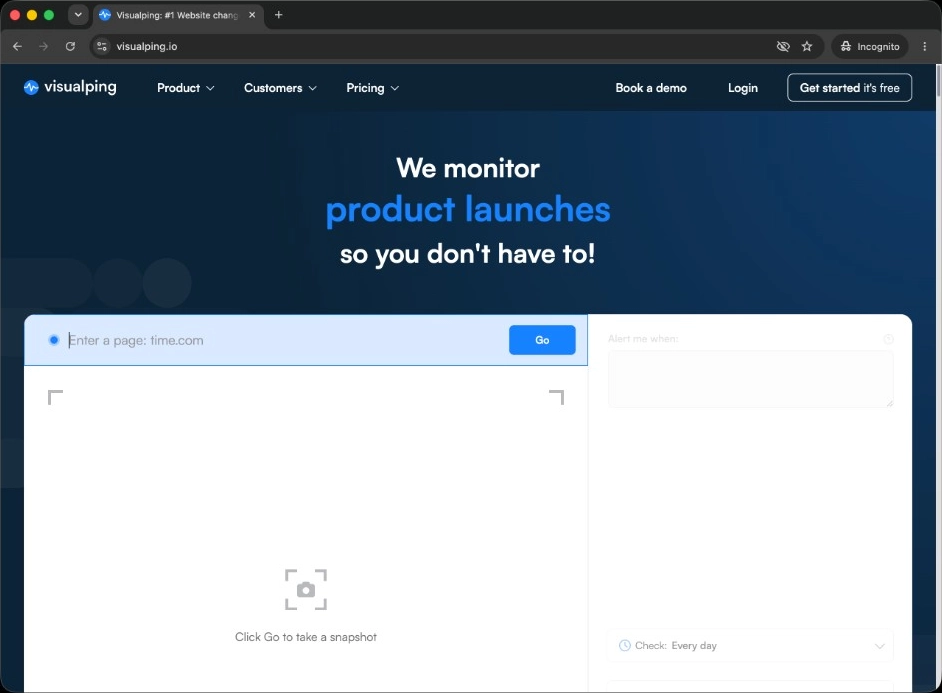
Visualping screenshots a page or a cropped region on a schedule, compares the render against the previous capture, and emails you the diff with the changed area highlighted. An AI summary and an "important" flag sit on top to help you triage. It works on any public URL, which is the real appeal: a careers page, a competitor's homepage, a government notice, and a conference agenda are all the same kind of job. The free tier covers 5 monitored pages and 150 checks a month, Personal plans start from about $10 a month, Business plans with team workspaces and Slack alerts from about $100 a month, and Solutions plans from around $3,000 a year. Pricing was verified at draft time, and Visualping revises its tiers periodically, so check the current plan page before budgeting.
Competiflow
Competiflow takes a competitor's homepage URL, discovers the pages worth watching (pricing, changelog, blog, docs, homepage), and parses each one into normalized fields before any comparison runs. A pricing page becomes a set of plans, each with a name, a price, a billing period, and feature contents. When a tracked field moves, you get a change record with the field path, both values, a severity score, a plain-language summary, and a why_it_matters line. The free trial includes 100 checks, up to 3 competitors, and up to 15 monitors on a daily cadence. Starter is $19 a month for 2,000 checks and 20 monitors, Growth $49 for 5,000 checks at a six-hourly cadence, and Pro $99 for 10,000 checks hourly. The narrower scope is deliberate: Competiflow watches competitive intelligence surfaces, so a stock level on a retail SKU or a job board listing is out of range.
Competiflow vs Visualping compared
The two products split on two axes: what the monitor treats as a unit of change, and how much interpretation ships inside the alert. Everything else follows from those choices.
| Visualping | Competiflow | |
|---|---|---|
| Detection unit | Rendered screenshot, optional region crop | Normalized fields extracted per page type |
| What the alert contains | Highlighted image region, percent changed, AI summary | Field path, old value, new value, severity, summary, why_it_matters |
| Price extraction | No, you read the screenshot | Yes, plan name and price as fields |
| Page coverage | Any public URL | Competitor pricing, changelog, blog, docs, homepage |
| Setup per competitor | One URL per monitor, region selection by hand | One homepage URL, discovery seeds the monitors |
| Metering | Monitored pages plus checks per plan | Monthly pool of checks plus a monitor cap |
| Entry pricing | Free 5 pages / 150 checks; Personal from ~$10/mo; Business from ~$100/mo | Trial 100 checks; Starter $19/mo; Growth $49/mo; Pro $99/mo |
| Agent and API access | Integration-focused, aimed at people and Zapier-style flows | REST API plus an MCP server agents call directly |
| Team features | Workspaces, Slack and Teams alerts on Business | Workspaces, shared feed, email digest |
Neither column wins outright. Visualping covers page types Competiflow will never touch, and Competiflow returns data Visualping was never built to produce. If you want a wider shortlist that includes selector-based and archive-first tools, see Visualping alternatives for pricing pages.
Setup runs in opposite directions. In Visualping you supply each URL and select the region to watch. In Competiflow you supply one homepage and discovery finds the pages, which means less configuration and less control. Visualping will watch any public URL you can load, including page types no competitive intelligence tool models: a supplier's terms page, a regulator's notice board, a university admissions page. Competiflow discovery targets competitor surfaces and returns pricing, changelog, blog, docs, and homepage monitors, then you add manual monitors for anything discovery missed.
Agent access is the sharper split. The Competiflow MCP server exposes 18 tools, so an agent in Cursor or Claude Desktop can call list_changes filtered to monitor_type=pricing and min_severity=high, pull field diffs with get_change, and mark items reviewed with update_change. Discovery and on-demand checks are async, so add_competitor, check_monitor, and refresh_workspace return acknowledgements before final results land. Visualping's integrations point at people: email, Slack on Business tiers, and webhook-style handoffs. That fits a screenshot workflow, since a rendered image is not much use to an agent reading JSON.
Visual snapshot diffs vs field-level extraction
A visual snapshot diff answers "does this page look different?" A field-level diff answers "did the Growth plan price change?" On a pricing page, only the second question deserves an alert.
Visual comparison renders the page, subtracts the previous render, and reports where the two images disagree. Every pixel in that region carries the same weight, so a price, a rotated logo, and a font that loaded late are equally alertable. Region cropping helps, and on a static page the model is close to ideal. On a SaaS pricing page carrying a monthly/annual toggle, a currency switcher, a chat widget, and an A/B test, the render moves for reasons that have nothing to do with money.
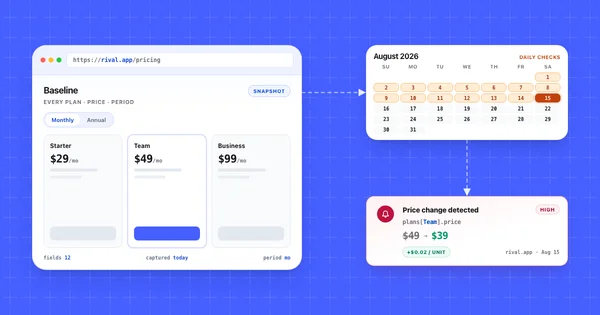
Field-level extraction inverts the order. The page is parsed into named values first, then the comparison runs against tracked fields only. A rotated testimonial is not a field, so it cannot produce an alert. When a tracked field does move, the record carries the evidence:
{
  "change": {
    "id": 901,
    "monitor_type": "pricing",
    "severity": "high",
    "summary": "Growth plan raised from $79 to $99/mo",
    "why_it_matters": "Northwind's Growth tier now sits above your comparable plan on monthly billing, which changes the mid-market comparison.",
    "source_url": "https://northwind.io/pricing",
    "field_diffs": [
      {
        "op": "modified",
        "change_type": "price_increase",
        "path": "plans[Growth].price",
        "tier": "alertable",
        "old": "$79",
        "new": "$99"
      }
    ]
  }
}
That envelope matches the Competiflow changes API: a change object with summary, severity, why_it_matters, source_url, and field_diffs carrying path, tier, old, and new. The trade-off is real. Extraction needs a schema per page type, and a competitor who invents a genuinely novel pricing layout can force the parser to adapt. Visual monitoring skips that maintenance and hands you the triage bill instead.
What actually reaches your inbox
Visualping sends a screenshot link for every render change. Competiflow sends one field-level alert when a tracked value moves. Both tools notice the same events on the page; the inbox load differs because only one names the event before you click.
Here is an illustrative week on a single competitor pricing page that runs A/B tests. It is a constructed example rather than a measured benchmark. Six things change: a testimonial photo rotates twice, the annual/monthly toggle loads in a different default state once, a footnote about fair-use limits is reworded, a new logo appears in the social proof strip, and the Growth plan goes from $79 to $99.
A visual monitor fires on all six, in roughly the order they happen, with the price change indistinguishable from the logo swap until you open the screenshot. The AI flag may raise the price alert, but the queue still has six items in it. A field-level monitor fires once. The testimonial and logo are not tracked fields, the toggle state is normalized away, and the footnote either lands as a low-severity content change or drops out entirely depending on your severity floor.
By Friday the difference compounds. Five dismissals a week trains you to skim, and skimming is how a real price cut gets dismissed at 6 a.m. alongside the cosmetic noise. If you want the setup that keeps false positives low on either tool, see how to monitor competitor pricing pages.
Pricing compared: monitored pages vs checks
Visualping meters monitored pages alongside a check allowance per plan. Competiflow meters a monthly pool of checks with a cap on how many monitors can draw from it. The shapes differ enough that a per-seat or per-page comparison misleads, so run the volume math for your actual cadence.
One page checked hourly costs about 720 checks a month. Daily is about 30, and every six hours is about 120. Those numbers set the ceiling on both sides.
| Scenario | Monthly checks | Competiflow plan | Visualping equivalent |
|---|---|---|---|
| 5 pricing pages, daily | ~150 | Starter $19/mo (2,000 checks) | Free tier is exactly at its 150-check limit |
| 4 competitors x 5 pages, daily | ~600 | Starter $19/mo, 20 monitors | Paid tier, 20 monitored pages |
| 20 pages, every 6 hours | ~2,400 | Growth $49/mo (5,000 checks) | Business-tier territory |
| 10 pages, hourly | ~7,200 | Pro $99/mo (10,000 checks) | Business tier or above |
Two details change the math in Competiflow's column. Competitors are uncapped on paid plans, so a fifth rival adds check usage without forcing a plan upgrade, and failed checks (blocked pages, timeouts) are never billed. Full metering rules are in Billing and checks. On the Visualping side, the free 5 pages and 150 checks is a genuinely usable allowance for one person watching a few static pages, and it costs nothing.
Cadence is where most budgets leak. SaaS pricing pages change a handful of times a year, so daily monitoring catches a move within 24 hours at a twentieth of the check cost of hourly. Save the fast cadence for changelogs and launch pages.
When Visualping is the better fit
Visualping is the better tool on unstructured pages, on a free-tier volume budget, and when the screenshot itself is the deliverable. Those cases are common enough that switching would cost some teams more than it returns.
The first is unstructured pages. A careers page, a status page, a regulatory notice, or a conference agenda has no fields worth parsing, so a screenshot with the changed region highlighted is a genuinely good answer. There is nothing for extraction to improve on.
The second is casual breadth at zero cost. Five monitored pages and 150 checks a month is a real free tier. One person tracking a few rivals loosely, checking pages weekly rather than triaging an inbox daily, has an annoyance rather than a workflow problem.
The third is when the screenshot is the deliverable. A before-and-after image lands harder in a leadership review than a JSON path, and some teams need the picture for internal proof more than they need parsed values. Visualping produces that artifact directly, with the capture attached to the alert you already received.
Which one to choose
Choose Competiflow when the alert has to name the plan and the price without a human opening the page. Choose Visualping when the page has no fields worth parsing or the capture is what you need to hand to someone. The matrix below maps that decision to the common situations by role and constraint.
| Your situation | Choose | Because |
|---|---|---|
| PMM who needs the changed plan row in Slack not a screenshot to open |
Competiflow | Field-level diffs carry old value, new value, severity, and why_it_matters |
| Watching a careers page, status page, or regulatory notice |
Visualping | No fields to extract A highlighted screenshot is the right output |
| Founder tracking four or five rivals across pricing and changelogs |
Competiflow | $19/mo with uncapped competitors and discovery-seeded monitors |
| One person watching three static pages on a zero budget |
Visualping | Free tier covers 5 pages and 150 checks a month |
| Engineer who wants competitor changes readable by an AI agent |
Competiflow | REST API plus an MCP server with list_changes and get_change |
| Needs a visual before-and-after image as evidence for stakeholders |
Visualping | The capture is the product attached to every alert |
| Triaging more than a handful of cosmetic pricing alerts every week |
Competiflow | Cosmetic churn is not a tracked field so it cannot alert |
Running both is more defensible than it sounds. A visual monitor for the picture and a structured monitor for the signal costs about $29 a month at entry tiers, which is less than an hour of the triage time it replaces.
Frequently Asked Questions
Does Visualping extract prices from a pricing page?
Visualping does not extract prices from a pricing page. It detects that a region changed and can summarize it in plain language, but it does not parse the pricing table into plan names and price values you can compare, filter, or export. To get a named plan and both values inside the alert, you need field-level extraction like Competiflow or a selector you maintain yourself.
Can Visualping monitor pricing pages?
Visualping can monitor any public URL, pricing pages included. You can crop the monitored region to the plan cards to cut some noise. The monitor will reliably tell you the pricing page changed. What it will not tell you is which plan moved and by how much without you opening the capture.
Is Visualping good for pricing pages?
Visualping works well on static pricing pages and gets noisy on dynamic ones. On a page that changes twice a year, it is accurate and cheap. On a page carrying rotating testimonials, a currency toggle, a chat widget, and A/B tests, the visual model fires on all of them, and the price change arrives in the same queue as the cosmetic churn.
When should you use Visualping?
Use Visualping when you are watching unstructured pages, when your volume fits the free or Personal tier, or when a before-and-after screenshot is the evidence you actually want. It is also the better choice for page types outside competitive intelligence entirely, such as regulatory notices or supplier terms pages.
When should you switch from Visualping to structured monitoring?
Switch when triage time starts costing more than the tool. The usual trigger is passing three or four competitors with a weekly review habit: at that point you are dismissing several cosmetic alerts for every real one, and you need the changed value in the alert body rather than in an image. Wanting the data in an API or a Slack message is the other common trigger.
How do I monitor competitor pricing pages?
Narrow what you watch to the plan cards, match cadence to how often the page really changes (daily is enough for most SaaS pricing), filter by severity before a human sees anything, and confirm monthly that the monitor still logs successful checks. The step-by-step version is in how to monitor competitor pricing pages.
What is the difference between Visualping and structured monitoring?
Visualping compares images of a page; structured monitoring compares named values extracted from it. That changes what an alert can say. A visual diff reports where the render disagrees with the last capture, while a field-level diff reports plans[Growth].price moving from $79/mo to $99/mo with a severity attached.
Competiflow vs Visualping: which one costs less?
At low volume Visualping costs less, since its free tier covers 5 pages and 150 checks a month and Personal plans start around $10. Past a few competitors the comparison flips, because Competiflow's Starter plan is $19 a month for 2,000 checks and 20 monitors with uncapped competitors, and Visualping's team features sit on the roughly $100 Business tier. Both sets of figures were verified at draft time.
Both tools do the job they were built for. Visualping is a good visual monitor, and Competiflow parses competitor pages into fields. If your pages are unstructured or your volume is small, the visual model never gets in your way. If you triage screenshots of a pricing table every week, you are paying for interpretation with your own attention.
Run the two-week head-to-head before you decide from a table, including this one. Point both at the same competitor pricing page for two weeks, wait for a real change, and count how many unrelated alerts arrived alongside it. That number settles the question in a way no feature comparison can. For a multi-vendor shortlist that goes beyond these two, see Visualping alternatives for pricing pages. For the wider market, see the full competitor monitoring tools comparison.