
Your competitor analysis template is a shared spreadsheet that started clean in Q1. Five tabs, three rivals, a notes column nobody reads. By June a rep quotes a price that left the pricing page in March, and the SWOT tab still describes a feature Harborline shipped eight weeks ago.
Nobody lied. The cells were true the day someone typed them. A template without a source URL and a checked date on every fact is a photograph with the timestamp torn off. This guide gives you the tab names, column headers, and fill rules so you can paste the structure into Google Sheets or Excel and keep it usable past the first planning cycle.
(Northwind, Harborline, and Ardent are composite competitors used as worked examples throughout. Numbers and URLs are illustrative. For the same format filled in with three real scheduling tools, every cell sourced and dated, see the competitor analysis example.)
What you'll learn
- What a competitor analysis template is for, and which jobs belong in other artifacts
- How to name and structure the workbook tabs in Sheets or Excel
- How to set up frozen headers, a confidence dropdown, and stale-row highlighting
- How to fill the competitor overview template with provenance columns
- How to add pricing, features, SWOT, and scorecard sheets without rebuilding a matrix guide
- Why every fact cell needs a source URL and a checked date
- How to keep the competitor analysis spreadsheet current without quarterly rebuilds
- Mistakes that make a competitive analysis template quietly wrong
TL;DR: Paste a competitor analysis template into Sheets or Excel with five working tabs: overview, pricing, features, SWOT, and scorecard. Put one fact, a source URL, and a checked date on every cell that claims something about a competitor. Refresh volatile rows on a cadence instead of rebuilding the file each quarter.
What a competitor analysis template is (and is not)
A competitor analysis template is a reusable spreadsheet structure for capturing rival facts in fixed columns so the next person does not invent a new layout. It is a working file for product, marketing, and leadership. It is not a sales talk track, a category map, or a file you never customize.
The job is narrow on purpose. You open the sheet to record who a rival is, what they charge, what they ship, how you score against them, and where the evidence lives. When the same file also tries to win a live deal and plot twelve logos on two axes, nobody trusts any of the tabs. The table below sorts the usual competitor analysis models by the question each one answers, so you can see which ones belong in this workbook.
| Artifact | Answers | Shape | Belongs in this template? |
|---|---|---|---|
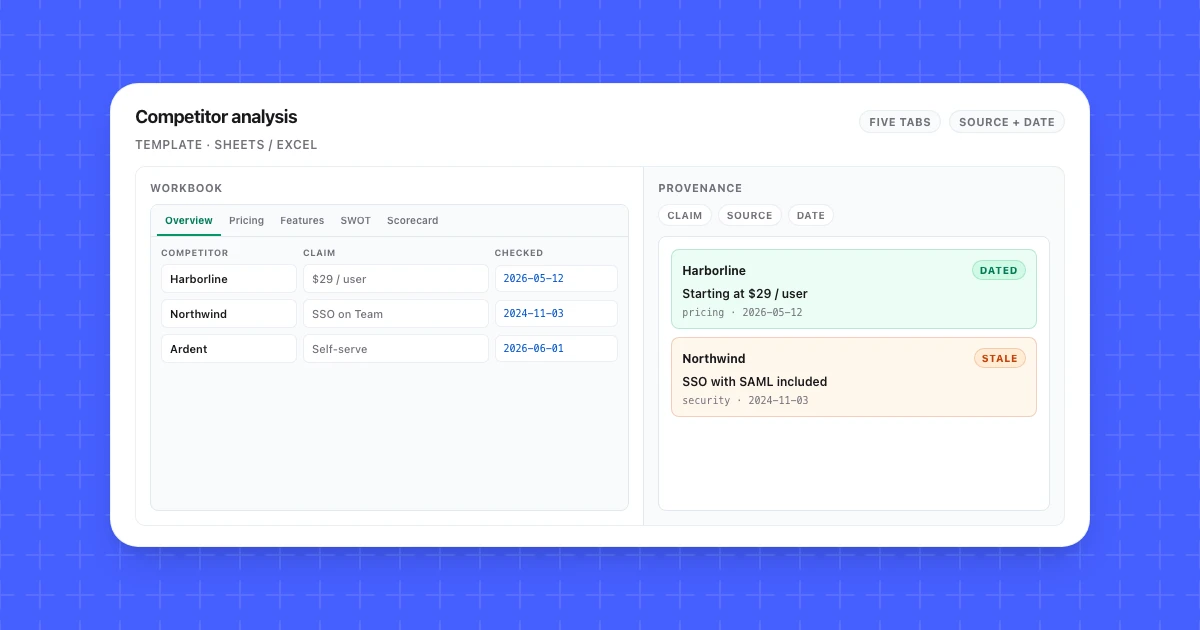
| Competitor analysis spreadsheet | What do we know about each rival, with sources? | Multi-tab workbook: overview, pricing, features, SWOT, scorecard | Yes. This is the file. |
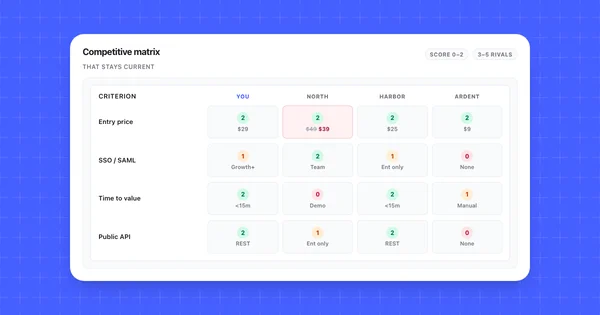
| Competitive matrix | How do we compare on criteria buyers weigh? | Grid: competitors by criteria, one fact per cell | Related. Build steps live in how to build a competitor comparison matrix. Your scorecard tab can feed it. |
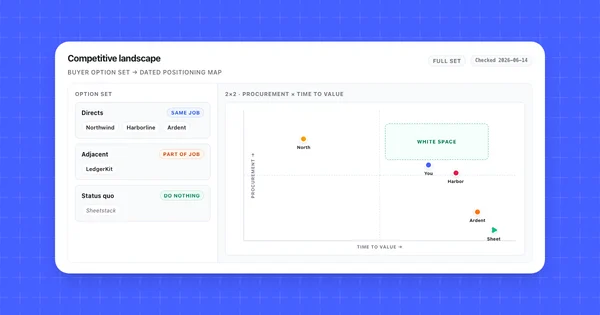
| Competitive landscape | Who is in the buyer's full option set? | Two-axis map or cluster list | No. Do that work in competitive landscape analysis, then pull three to five names into this workbook. |
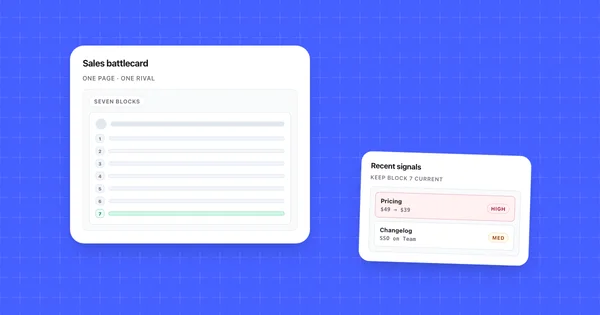
| Battlecard | What do I say on a call against one rival? | One competitor, objections and traps | No. Derive from one overview column; see competitor battlecards. |
| SWOT | What is true about us, internally and externally? | Four quadrants, usually one company | Yes as a thin tab. One SWOT per rival or one for you. |
| Positioning map | Where does each rival sit on two criteria buyers care about? | Two-axis plot, one dot per option | No. It lives with the landscape work above. Take the axis values from sourced scorecard facts. |
| Competitor audit / marketing tracker | Which channels, campaigns, and content does each rival run? | Running log of ads, emails, social posts, and SEO pages | No. Keep it in its own file. This workbook covers product, pricing, and evidence. |
Two rules keep the template honest. If a claim cannot carry a URL and a date, it stays in Notes until someone verifies it. If a tab does not get opened in a normal month, delete it. Fancy formatting is optional. Provenance is not.
Build the workbook: tabs and naming
Create one workbook with five working tabs plus a shallow watchlist, name each tab so a stranger can find the right sheet, and freeze the header row on every tab. The steps are the same in Google Sheets and Excel; only the menus differ, and they are in Set up the sheet in Google Sheets or Excel below. You are copying structure, not fetching a branded blank file.
Suggested file name: competitor-analysis-YYYY-MM. When the schema changes, bump the month. Avoid v3-final clones in the same folder.
Competitor analysis format at a glance
The whole competitor analysis format fits in one table: seven tabs (five working tabs plus a readme and a watchlist), each with a fixed set of columns, every fact column paired with source_url and checked_date, and every SWOT bullet pointing at one of those cells. Use it as the checklist when you set up the file or review someone else's, and send it to anyone who asks what a competition analysis format looks like.
| Tab | Purpose | Key columns |
|---|---|---|
00_readme |
Owner, refresh cadence, scoring rule, composite disclaimer; 10 to 20 lines | owner, refresh cadence, scoring rule (0 / 1 / 2), composite note |
01_overview |
One row per competitor plus you: identity, ICP, positioning, status | competitor, homepage_url, category_role, primary_icp, entry_motion, positioning_claim, positioning_source_url, positioning_checked, status, owner_notes, last_full_review |
02_pricing |
One row per plan per competitor: list prices, packing, verifiable discounts | competitor, plan_name, list_price, price_unit, billing_options, source_url, checked_date, confidence |
03_features |
8 to 15 capabilities buyers ask about | criterion rows by competitor columns, plus a provenance block: cell, fact, source_url, checked_date |
04_swot |
Strengths, weaknesses, opportunities, threats; one block per competitor (or one for you) | competitor, quadrant, notes (four bullets max, each pointing at a sourced pricing or features cell or labeled as a hunch) |
05_scorecard |
Shared criteria, the same ones as your deal matrix, with 0 to 2 scores and provenance | competitor, criterion, score (0 / 1 / 2), one_line_fact, source_url, checked_date |
99_watchlist |
Names not yet in the active set | name, why, URL |
Numbered prefixes keep tab order stable. On 00_readme, write owner (one person), refresh cadence, the 0 / 1 / 2 scoring rule, and whether any rivals are composites. Use ISO dates in every checked_date column, put URLs in their own column, and keep one fact per cell. Do not paint your own column green by default.
The generator at the end of this guide builds tabs 01_overview through 05_scorecard with a simpler schema: shorter headers, one source_url and checked_date pair per row, and a features tab laid out as one row per capability instead of a grid. Add 00_readme and 99_watchlist yourself. The setup section below adds the confidence column and frozen header rows the download leaves out.
If you would rather start with one tab, log every fact as a row in a flat table with five columns, competitor | attribute | fact | source_url | checked_date, and split it into tabs once it outgrows a single screen. The scored criteria-by-competitor grid is covered by the matrix row of the first table in this guide.
Choose which rivals go in the template
Cap active rivals at three to five. For the worked file: Northwind is the incumbent, Harborline is the near-twin, and Ardent is the cheap self-serve option. Everyone else stays on 99_watchlist until they appear in lost deals or unprompted discovery mentions.
Fill the active slots with direct competitors first, and give an indirect competitor or a substitute a slot only when buyers name it in lost deals. Direct competitors sell a similar product to the same buyer for the same budget. Indirect competitors solve part of the job from a neighboring category, such as a broad marketing suite with a competitor tab.
Substitutes are what the buyer does instead of buying anything: a shared spreadsheet, a Slack channel, or someone checking pricing pages on Fridays. All three worked rivals here are direct. If you have not mapped the full option set yet, do that in a competitive landscape analysis first, where these groups are called directs, adjacents, and status quo.
Fill the competitor overview template
Fill the overview tab with one row per competitor, identity fields first, then positioning and status, and attach a source URL and checked date to every claim that is not a proper noun. This is the competitor overview template most people mean when they ask for a company profile sheet.
| Column | What goes in it | Example (Harborline, illustrative) |
|---|---|---|
competitor |
Display name | Harborline |
homepage_url |
Canonical homepage | https://harborline.example/ |
category_role |
Incumbent / peer / price-led / adjacent | Peer (fast-follower) |
primary_icp |
Who they sell to in one line | Mid-market ops teams, 50 to 500 seats |
entry_motion |
Self-serve, sales-led, or hybrid | Hybrid: trial, then AE |
positioning_claim |
Their homepage promise in their words | "Ship competitive insights without a CI team" |
positioning_source_url |
Page where that claim appears | https://harborline.example/ |
positioning_checked |
Date you verified the claim | 2026-07-14 |
status |
Active / watchlist / retired | Active |
owner_notes |
Internal only: why they matter | Shows up in 30% of lost mid-market deals |
last_full_review |
Date of last pass across all tabs | 2026-07-14 |
Worked overview rows (illustrative composites):
| competitor | category_role | entry_motion | positioning_claim | positioning_checked |
|---|---|---|---|---|
| You | (your role) | Self-serve + AE | Your real homepage line | 2026-07-14 |
| Northwind | Incumbent | Demo required | "The trusted platform for competitive ops" | 2026-07-14 |
| Harborline | Peer | Hybrid trial | "Ship competitive insights without a CI team" | 2026-07-14 |
| Ardent | Price-led | Self-serve only | "Competitor tracking that stays cheap" | 2026-07-14 |
Quote positioning in the rival's words. Skip vanity fields you cannot refresh. Put yourself on the sheet. Soft judgment (owner_notes, ICP guesses) can skip source columns if labeled internal. Everything else gets a URL and a date.
Add pricing and features sheets
Add pricing for plan economics and features for buyer-facing capabilities. Keep each tab to column schema and fill rules. Pricing and features are the sourced fact tabs; SWOT and scorecard sit later because they layer judgment on those cells.
02_pricing
One row per published plan.
| Column | Example (Northwind Team, illustrative) |
|---|---|
competitor |
Northwind |
plan_name |
Team |
list_price |
$39 / mo |
price_unit |
Per workspace + $0.02 / unit |
billing_options |
Monthly, annual (-20%) |
source_url |
https://northwind.example/pricing |
checked_date |
2026-07-14 |
confidence |
High (vendor page) |
| competitor | plan_name | list_price | price_unit | checked_date |
|---|---|---|---|---|
| You | Growth | $29 / mo | Per workspace, flat | 2026-07-14 |
| Northwind | Team | $39 / mo | Per workspace + $0.02 / unit | 2026-07-14 |
| Harborline | Pro | $25 / mo | Flat to 50k events | 2026-07-14 |
| Ardent | Starter | $9 / mo | Per workspace, flat | 2026-07-14 |
If a price came from a prospect repeating a sales quote, set confidence to Low until you see it on a page or in a trial.
03_features
Rows are capabilities a buyer asks about. Columns are competitors. Keep a provenance block under the grid so the pretty table never becomes the only record.
| criterion | You | Northwind | Harborline | Ardent |
|---|---|---|---|---|
| Time to first useful result | Under 15 min, self-serve | Demo required before trial | Under 15 min | Fast signup, manual setup |
| SSO / SAML at buyer tier | Growth and above | Included on Team | Enterprise only | Not offered |
| Public REST API | Documented, no gating | Enterprise only | Documented | None |
| Data export in-app | CSV and JSON | CSV via support | CSV in-app | CSV, weekly cap |
| cell | fact | source_url | checked_date |
|---|---|---|---|
| Northwind · SSO | SAML included on Team | https://docs.northwind.example/sso |
2026-07-14 |
| Harborline · SSO | SAML GA, Enterprise only | https://harborline.example/changelog/saml |
2026-07-18 |
| Ardent · API | No public API | https://ardent.example/docs |
2026-07-14 |
Eight to fifteen criteria is enough. A forty-row feature dump dies first. Pull criteria from lost-deal reasons and discovery questions, not from your roadmap wishlist.
Add SWOT and scorecard sheets
Add a thin SWOT tab for judgment and a scorecard tab that points at sourced facts. Keep both short enough that someone can refresh them in the monthly pass.
04_swot
Four bullets per quadrant, max. Example Harborline block (illustrative):
| Quadrant | Notes |
|---|---|
| Strengths | Weekly ship cadence; clear mid-market pricing; API documented |
| Weaknesses | SSO gated to Enterprise; support is next-business-day only |
| Opportunities | Buyers asking for "lighter than Northwind"; win-loss mentions setup speed |
| Threats | Could drop SSO a tier; usage metering may appear above 50k events |
SWOT is judgment layered on facts. If a bullet cannot point at a sourced cell on pricing or features, label it as a hunch.
05_scorecard
Use one row per shared criterion and columns for each competitor plus score, one_line_fact, and a pointer to the sourced pricing or features cell. Put the scoring scale on 00_readme once. For choosing criteria and reading white space end to end, use the competitive matrix guide. Do not average scores into a vanity total. When names leave the deal set, demote them to 99_watchlist.
Require a source URL and checked date in every fact cell
Every fact cell in a competitor analysis template needs three parts: the claim, the source URL where you saw it, and the date you checked. Without those two provenance fields, the sheet cannot be audited, refreshed, or defended in a planning review. Most competitive analysis templates skip this and leave "where did we learn that" as optional notes. Optional notes are where stale prices hide.
| Field | Required on | Example |
|---|---|---|
fact |
Overview claims, pricing, features, scorecard | Team plan is $39/mo + $0.02/unit |
source_url |
Same | https://northwind.example/pricing |
checked_date |
Same | 2026-07-14 |
confidence |
Pricing and anything not from a vendor page | High / Medium / Low |
| Tier | Source | Allowed in fact cells? |
|---|---|---|
| 1 | Vendor pricing, docs, changelog, security page | Yes |
| 2 | Your own trial or free account | Yes |
| 3 | Public filings, marketplace listings | Yes, with date |
| 4 | Win-loss and CRM notes | Yes for buyer belief; verify before treating as product fact |
| 5 | Review sites and community threads | Only after tier 1 or 2 check |
| 6 | Competitor claims relayed by prospects | No. Log as a lead, then verify. |
Worked provenance rows for the illustrative Northwind price change:
| cell | fact | source_url | checked_date | confidence |
|---|---|---|---|---|
| Northwind · Team price | $39/mo + $0.02/unit | https://northwind.example/pricing |
2026-07-14 | High |
| Northwind · Team price (prior) | $49/mo flat | https://northwind.example/pricing |
2026-02-10 | High (archived check) |
| Harborline · SSO | SAML on Enterprise only | https://harborline.example/changelog/saml |
2026-07-18 | High |
| Ardent · SSO | "SSO is coming" via prospect | (none yet) | 2026-07-10 | Low · not a fact cell yet |
Keep the prior price with its own checked date. Prefer adjacent columns (fact | source_url | checked_date) so you can sort for staleness. Cell comments work for rare overview fields; they fail for pricing.
Staleness rule for 00_readme: high-volatility fields (price, plan packing, feature tier gates) older than 30 days are unverified until someone re-opens the URL. Security and support commitments can sit at 90 days. If two people disagree about a cell, the URL decides.
Set up the sheet in Google Sheets or Excel
Four settings make the competitor analysis spreadsheet easy to audit: a frozen header row, a confidence dropdown, a highlight on stale rows, and a sort by checked_date. They work the same way in Google Sheets and Excel. Only the menus differ, and the paths below match the Google and Microsoft help pages as of October 2026.
Freeze the header row. In Sheets, choose View > Freeze > 1 row. In Excel for Windows, select A2, then View > Freeze Panes > Freeze Panes. Excel for Mac has View > Freeze Top Row. Repeat on each tab, since the downloaded workbook ships without frozen rows.
Add a confidence dropdown. The downloaded 02_pricing tab ends at checked_date in column G, so type confidence in H1 and select H2:H1000. In Sheets, choose Data > Data validation > Add rule, set the criteria to Dropdown, and enter High, Medium, and Low. In Excel, choose Data > Data Validation, set Allow to List, type High,Medium,Low in Source, and leave In-cell dropdown ticked. Sheets rejects other values by default. In Excel, pick the Stop style on the Error Alert tab to do the same.
Highlight stale rows. On 02_pricing, select A2:H1000 with A2 as the active cell. In Sheets, choose Format > Conditional formatting, pick Custom formula is under "Format cells if", enter the formula below, choose a fill, and click Done. In Excel, choose Home > Conditional Formatting > New Rule > Use a formula to determine which cells to format, enter the formula, then set a fill under Format. On a Mac, set Style to Classic before you pick the formula option.
=AND($G2<>"",TODAY()-$G2>30)
The formula is written for the first row of the range. $G locks the column, so every cell in a row checks that row's checked_date, and the whole row turns color once the date is more than 30 days old, matching the staleness rule above. The $G2<>"" part keeps empty rows from lighting up. On other tabs, point the formula at that tab's checked_date column and trim the range to match. In the downloaded workbook that is G on 01_overview, E on 03_features and 04_swot, and F on 05_scorecard. The download stores those dates as real date cells, so the rule works without retyping anything. Nothing turns color on day one, since the scaffold rows carry the download date.
Sort by age. In Sheets, choose Data > Create filter view, sort checked_date A to Z from the column's filter icon, and save the view. A filter view changes only your screen, while a plain filter (Data > Create a filter) shows up for everyone who opens the file. In Excel, click a cell in checked_date and choose Data > Sort Oldest to Newest. Add Data > Filter when you want to narrow the list to one competitor.
Keep the competitor analysis spreadsheet current
Keep the spreadsheet current by attaching a refresh cadence to each row type, reviewing volatile tabs monthly, and watching public pages so you learn about price and feature moves before a prospect does. The usual failure mode is a file built once, cited for months, and wrong in silence.
| Row or tab | How often it moves | Suggested refresh |
|---|---|---|
| Pricing list prices and packing | A few times a year, often quiet | Weekly eyes or a page monitor |
| Feature tier gates and API surface | Monthly for fast shippers | Weekly on changelog and docs |
| Homepage positioning claims | Quarterly | Monthly overview pass |
| SWOT bullets | When facts move | After pricing or feature changes |
| Scorecard scores | When the underlying fact moves | Same day as the fact update |
| Security / SOC status | Yearly | Quarterly manual |
| Watchlist names | Event-driven | Monthly skim of lost-deal reasons |
Monthly refresh ritual
First Monday, about thirty minutes:
- Sort
02_pricingand03_featuresbychecked_dateascending. - Re-open every URL older than your staleness rule.
- Update the fact, stamp today's date, adjust the scorecard if the score changed.
- Rewrite any SWOT bullet that pointed at the old fact.
- Promote or demote watchlist names from CRM loss reasons.
Manual review works for two rivals and a handful of URLs. Past that, page monitoring pays for itself on pricing, changelog, docs, and homepage surfaces. Example: an interpreted pricing change for Northwind Team lands Tuesday; the owner updates 02_pricing list_price, stamps checked_date, and adjusts the matching scorecard row the same day.
Competiflow is optional here: add a competitor by homepage URL, seed monitors for those surfaces, and treat interpreted changes as a queue of cells to update. Monitor setup is in Monitors. You still need a cadence and an owner first. Update price and packaging cells the same day you learn about them; medium changelog items can wait for Monday.
Common mistakes when using a competitive analysis template
Competitive analysis templates fail when they sprawl, skip provenance, mix audiences, or sit without an owner.
- Too many active competitors. Cap at five. Park the rest on
99_watchlist. - No source URL or checked date. Six months later nobody knows where Ardent's price came from.
- One tab doing four jobs. Split overview, battlecards, landscape, and SWOT. Link out when those jobs appear.
- Feature rows written from your roadmap. Pull criteria from lost-deal reasons and discovery questions.
- Relayed sales claims treated as facts. Verify on a tier 1 or 2 source first.
- No owner and no cadence. Name a person. Put the monthly pass on a calendar.
- Pretty scorecard, empty provenance. Scores without URLs are opinions with formatting.
- Never retiring rows. Delete cosmetic criteria and dead rivals.
Trust in month four comes from short tabs, dated cells, and an owner who can say "we do not know yet."
Frequently Asked Questions
What is a competitor analysis template?
A competitor analysis template is a reusable spreadsheet layout for recording rival facts in fixed columns across overview, pricing, features, SWOT, and scorecard tabs. It exists so every claim sits next to a source URL and a checked date. It is a working research file, not a battlecard and not a landscape map.
What is a competitive analysis template?
A competitive analysis template is a reusable spreadsheet structure for capturing rival facts in fixed columns across overview, pricing, features, SWOT, and scorecard tabs. Teams use "competitive analysis template" and "competitor analysis template" for the same multi-tab file. What matters is the schema and the provenance, not the filename label.
How do you create a competitor analysis spreadsheet?
Create a workbook with a readme, overview, pricing, features, SWOT, scorecard, and watchlist tab. Add three to five active rivals, define a 0 to 2 scoring rule once, and require source_url and checked_date on every fact. Fill overview and pricing first, then features and scores. Set a monthly refresh pass before you share the file widely.
What should a competitor overview template include?
A competitor overview template should include name, homepage URL, category role, ICP, entry motion, a quoted positioning claim with source and date, status, and internal notes. Skip vanity metrics you cannot re-verify. Include a row for your own company scored with the same coldness as every rival.
Competitor analysis template Excel or Google Sheets: which is better?
Either works if the columns stay the same. Google Sheets shares and co-edits by default. Excel co-edits in real time too when the file sits in OneDrive or SharePoint. Pick the tool your team already opens weekly. The schema matters more than the vendor. The freeze, dropdown, and stale-row steps for both are in Set up the sheet.
How often should you update a competitor analysis template?
Update pricing and tier-gated features at least monthly, and sooner when you learn about a change. Re-check homepage positioning monthly. Refresh SWOT when underlying facts move. Run a full pass across active rivals each month with one named owner. Volatile rows deserve page monitoring once manual tab-opening falls behind.
What is the difference between a competitor analysis template and a competitive matrix?
A competitor analysis template is the multi-tab evidence workbook (overview, pricing, features, SWOT, scorecard). A competitive matrix is the criteria-by-competitor grid used to compare deal rivals on buyer decision factors. The scorecard tab can mirror a matrix, but the full method for choosing criteria and reading white space is in how to build a competitor comparison matrix.
Is there a free competitive analysis template I can use without a download?
Yes, you can use this free competitive analysis template without an account or an email address. Copy the tab names and column headers from this guide into a blank Sheet, or use the template generator at the end of this article to copy Markdown or download an Excel workbook (.xlsx, which you can open in Google Sheets with File > Import). The value is the structure, the provenance columns, and the refresh habit.
Is a competitive intelligence template different from a competitor analysis template?
A competitive intelligence template is usually the same rival-fact workbook with a collection and refresh routine attached. The competitor analysis template holds the facts. The intelligence part is the named owner, the cadence on 00_readme, and the monthly pass that turns changed pages into updated cells. For how that loop works across a team, see what is competitive intelligence.
Can I use this template for a business plan?
Yes, the overview and pricing tabs supply most of what a business plan's competition section asks for. Pull one row per rival from 01_overview for who they sell to and how, and take entry prices from 02_pricing. Keep the source URLs and checked dates in a footnote or appendix so a reader can verify each claim. Leave the SWOT and scorecard tabs out unless the plan asks for them, since they hold internal judgment.
A competitor analysis template is only worth building if someone can trust a cell three months later. That trust comes from short tabs and a source URL plus checked date on every fact.
Paste the structure into Sheets or Excel, fill overview and pricing first, and put one owner on a monthly pass. When a price moves, update the cell the same day. The sheet stays a tool. It never becomes competitor-analysis-v3-FINAL.